Privacy with Double opt-in for your WhatsAppmarketing.
SmartChat automatically sends every new prospect a confirmation message via WhatsApp. Only after they click Confirm can you send them the newsletter and follow-ups.

In five steps to a subscriber.
From signing up to the first follow-up, SmartChat handles everything automatically.
Sign-up
Your prospect enters their first name and WhatsApp number on your landing page or in the website popup .
First name and numberconfirmation message
SmartChat automatically sends them a confirmation message via WhatsApp, with the Confirm button.
AutomaticOne click
They click Confirm and from that moment on are a subscriber to your WhatsApp newsletter.
ConfirmThank-you message
Right after that comes your thank-you message, delivering what your landing page promises.
InstantlyFollow-ups
If you have set up follow-ups , these are sent automatically from now on.
On the chosen day
Every path goes through the confirmation.
No matter how a prospect gets onto your list: before they get your newsletter, they confirm once themselves in WhatsApp.
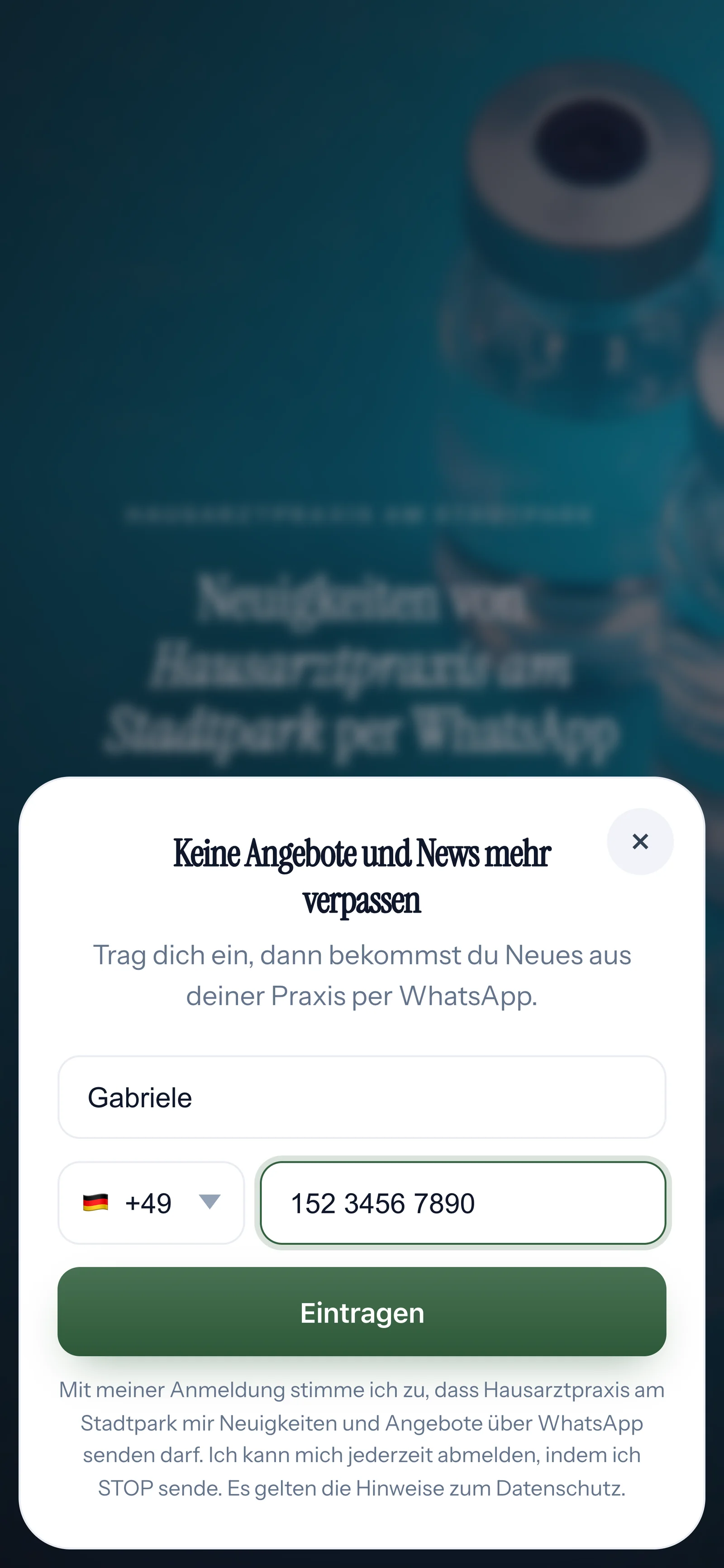
Through your landing page
Your prospect enters their first name and WhatsApp number. SmartChat builds you the landing page with this form.
Through the QR code
Anyone who sees the code scans it and lands on your landing page. From there it continues the same way.
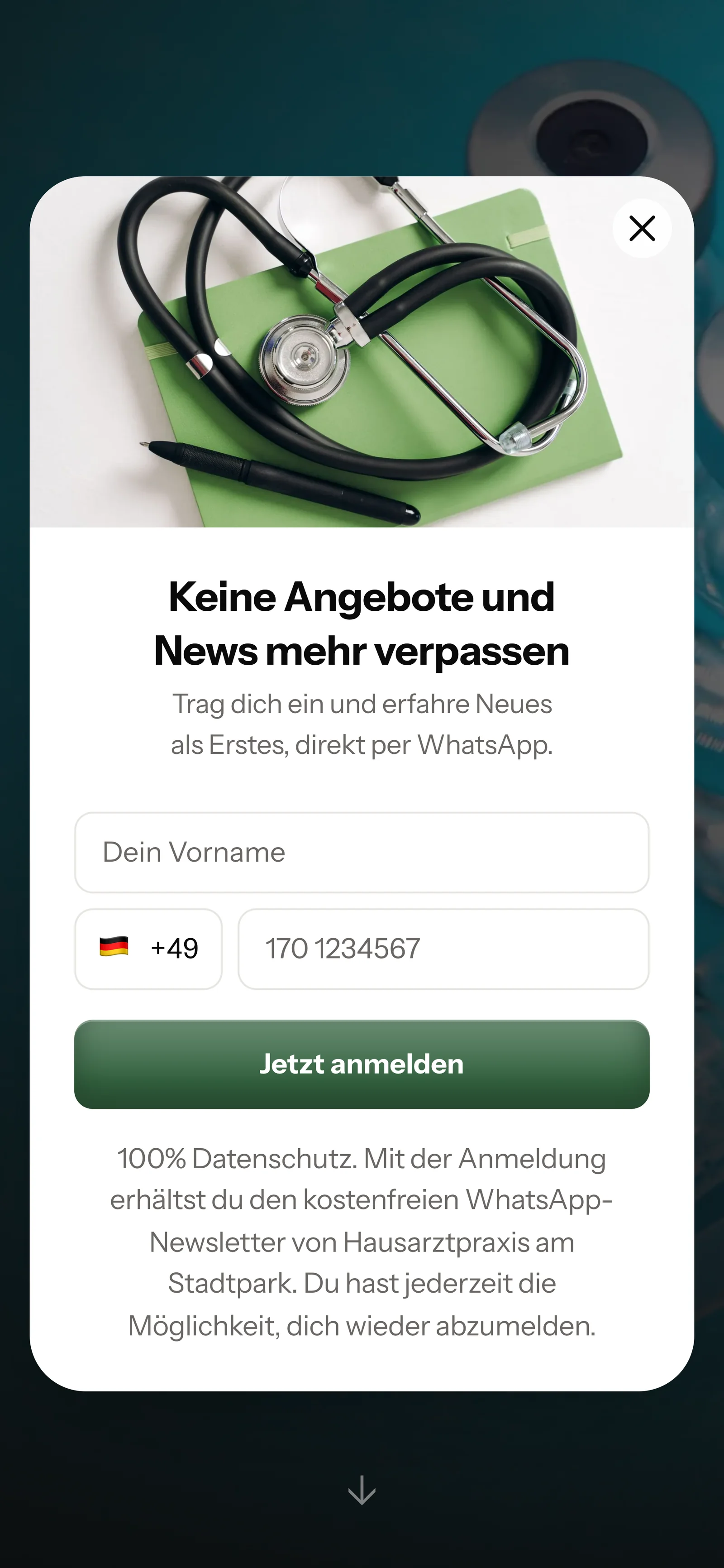
Through the website popup
A popup opens on your website. One click, and the sign-up starts.
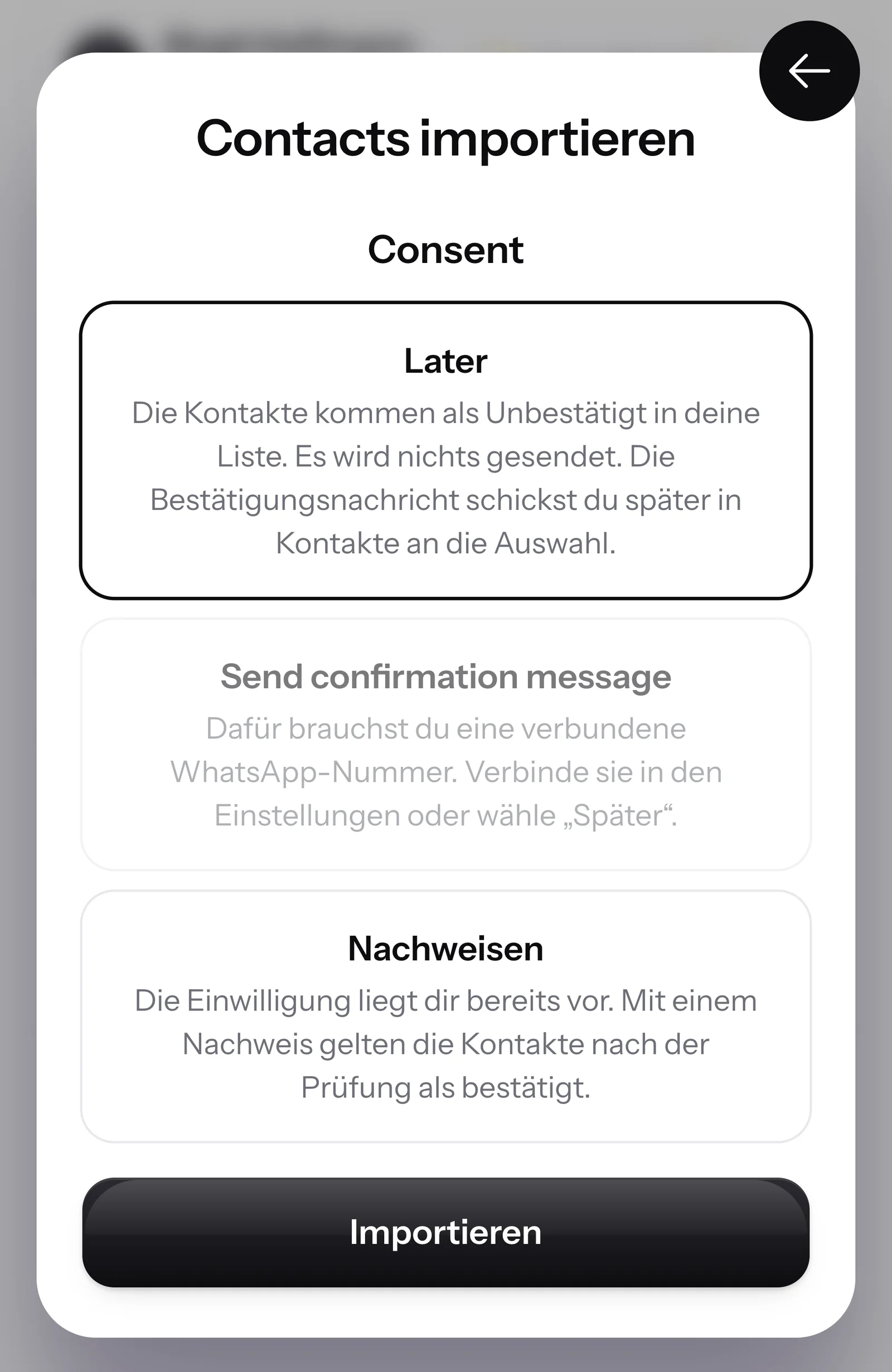
When importing a list
If you upload contacts, you choose whether SmartChat sends everyone the confirmation message right away.
Added by hand
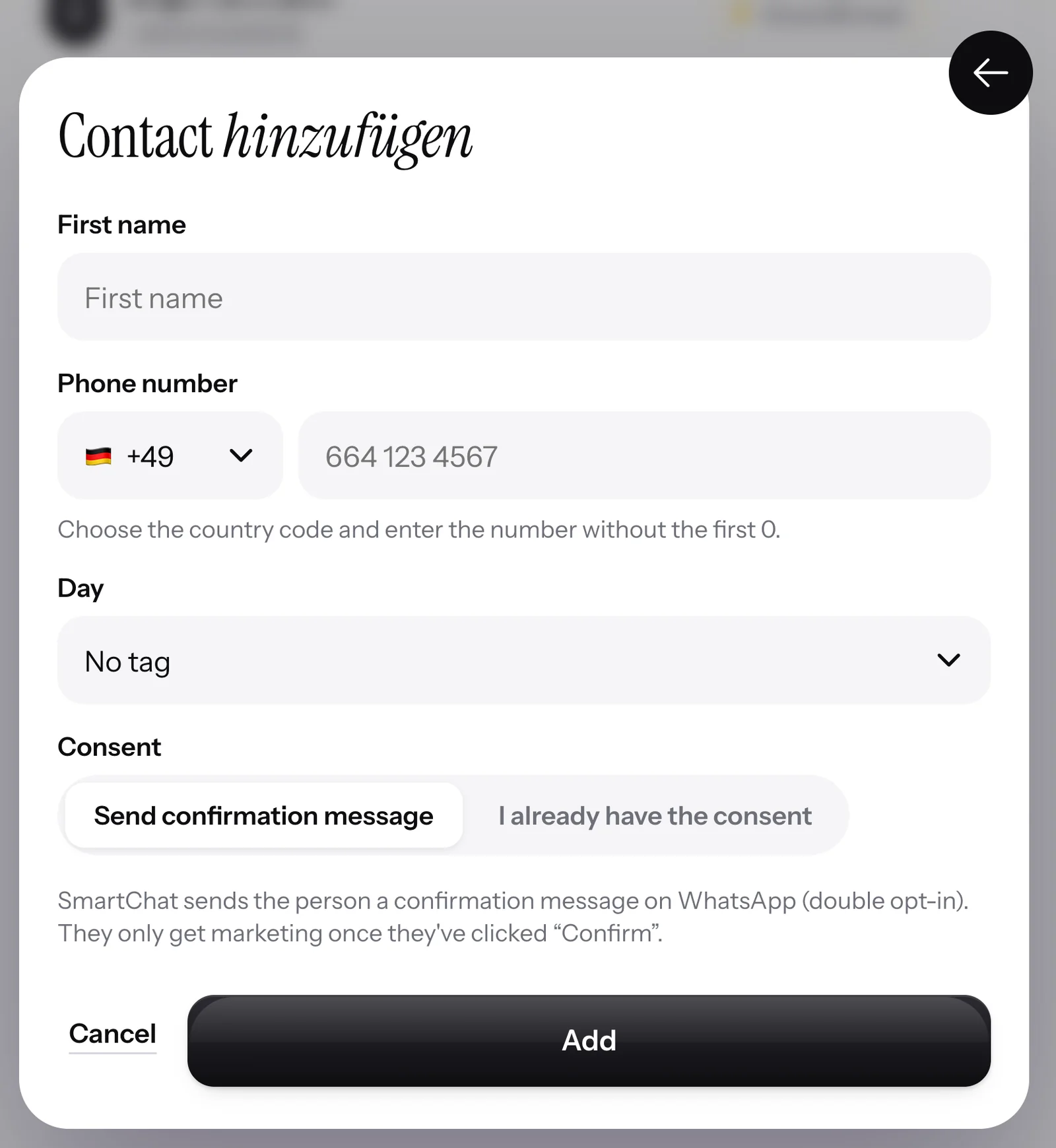
If someone calls you and wants your newsletter, you add them yourself. If you already have their consent, you upload the proof.
You see who has already confirmed.
In your contacts, every entry carries its status. When someone clicks Confirm, they jump from Unconfirmed to Confirmed.

Only confirmed contacts get your newsletter!
Newsletters and follow-ups are only sent to confirmed contacts.
Filter by status
One click shows you all unconfirmed, all unsubscribed or all new ones from this week.
With source
For every contact, it says whether they came through the landing page, QR code, popup or import.
After the confirmation, it continues automatically.
Confirmation and thank-you message are the fixed automation that every SmartChat account has. After that come the follow-ups, which you can set up yourself.

Thank-you message arrives immediately
As soon as someone has confirmed, the thank-you message introduces your business.
Follow-ups
Every follow-up arrives on the day you choose.
Your automations too
Every automation with the trigger New sign-up confirmed starts at the same moment.
One click for all unconfirmed.
If someone missed the first message, you send them the confirmation message again. That works for unconfirmed contacts.

Fitting your number's daily limit
If there are more than your number may reach in one day, SmartChat automatically spreads the confirmation messages over several days.
Never twice
If someone signs up twice, SmartChat doesn't create a second contact.
That's why double opt-in at SmartChat is mandatory.
Without confirmation, you can't prove who really wants to receive your messages. With double opt-in, every contact confirms their sign-up themselves in WhatsApp, and you have the proof.
Without double opt-in
- Not GDPR-compliant, because nobody can show when someone consented
- One swapped digit, and your newsletter lands with a stranger
- Anyone who signs up twice gets everything twice
- An old list brings unsubscribed people back
With SmartChat
- For every contact, the source, time and wording of the consent are recorded
- Newsletters and follow-ups are only sent to contacts who have confirmed in WhatsApp
- A second entry doesn't create a second contact
- Anyone who has written STOP stays unsubscribed
Every consent comes with proof.
SmartChat records for every contact how they signed up and when they confirmed. You download the proof of consent as a PDF.

As a PDF to download
The proof contains the source, time, the wording of the consent and a later revocation.
Full history
Every step appears with date and time in the contact's history.
Stays saved
The proof belongs to the contact, even if they unsubscribe later.
Unsubscribe with one word.
If a subscriber doesn't want to receive anything anymore, they write STOP in the chat. SmartChat replies with a fixed message and follows it from that moment on.
Effective immediately
No more newsletters, no follow-ups, no automations. Messages that were already scheduled are deleted by SmartChat.
Status Unsubscribed
In your contacts, they now show as Unsubscribed. Only they themselves can sign up again.
You unsubscribe people too
If someone asks you on the phone, you unsubscribe them with one click. This unsubscription is final.

In every plan included.
Double opt-in belongs to every account, including Free. It takes up one spot in your automations. All prices plus VAT.
| Free | Starter | Basic | Pro | |
|---|---|---|---|---|
| Price per month | 0 € | 299 € | 499 € | 999 € |
| Double opt-in with confirmation message | yes | yes | yes | yes |
| Thank-you message after confirming | yes | yes | yes | yes |
| Counts toward your messages | yes | yes | yes | yes |
| Automations in total | 1 | 1 | 3 | unlimited |
| Proof as PDF | yes | yes | yes | yes |
Frequently asked questions about Double opt-in.
What does double opt-in mean at SmartChat?
Every new prospect gets a confirmation message from SmartChat via WhatsApp, with the Confirm button. Only after they click it do they get your newsletter and your follow-ups. Messages from automations, for example an appointment confirmation, are sent to every contact who hasn't unsubscribed with STOP. This process runs fully automatically. How that looks in everyday use is shown by WhatsApp marketing for medical practices and WhatsApp marketing for clubs.
What does a prospect see right after signing up?
On the landing page it says: "Almost done! Please quickly confirm your sign-up." At the same time, the confirmation message arrives in their WhatsApp.
Can I label the "Confirm" button differently?
No. In German the button is always called Bestätigen, in the other languages Confirm, Conferma, Confirmer and Confirmar. That way every contact knows right away what the click does.
Can I change the text of the confirmation message?
Yes. You adjust the confirmation and thank-you message in the AI Chat. The Confirm button always stays. The note about STOP is in the message by default, and you can remove it. You can find an example with a confirmation and thank-you message under WhatsApp marketing for pharmacies.
What happens if someone signs up twice?
Then nothing happens. SmartChat doesn't create a second contact, whether they have already confirmed or not.
Does SmartChat remind contacts who haven't confirmed?
Not automatically. You send the confirmation message again with one click, individually or to all unconfirmed contacts in your selection.
What happens to contacts that I import?
When importing, you choose: Later, then they go into the list as Unconfirmed. Send confirmation message, then SmartChat writes to everyone right away. Or Provide proof, if you already have their consent.
How does a contact unsubscribe?
Anyone who has confirmed your newsletter writes STOP in the chat. SmartChat replies with a fixed unsubscribe message, and from then on SmartChat sends them nothing more. With START they can sign up again themselves.
Can I unsubscribe a contact myself?
Yes, with one click in your contacts, for one or many at once. SmartChat sends them no message in doing so, and a START doesn't undo this unsubscription either.
Will an unsubscribed contact receive messages again after a new import?
No. SmartChat remembers the number after an unsubscription. Even a new entry on the landing page or a new import changes nothing about that.
Does the double opt-in count as an automation?
Yes. It is the fixed automation that every SmartChat account has. Free and Starter have 1 automation, Basic 3 and Pro unlimited, each including the double opt-in.
Does the confirmation message cost credits?
No. The confirmation and thank-you message cost no credits. Every message counts toward your message allowance, including the confirmation and thank-you message. Free costs €0, the paid plans start at €299 per month, all prices plus VAT.
Does Meta charge anything for the confirmation message?
Meta bills the fees for WhatsApp messages directly to you, through the payment method in your Meta account. SmartChat adds nothing on top. With SmartChat, you also pay for your plan. You can find the current Meta fees under Meta fees.
Does Meta have to approve the confirmation message?
Yes, like every message a business sends on its own. SmartChat has Meta approve it. Until it's approved, the confirmation message waits, and after that it is sent automatically.
Your double opt-in is ready in 60 seconds.
Enter your website. SmartChat AI analyzes it, and in 60 seconds your landing page, confirmation message and thank-you message are ready.