The landing page for your WhatsApp newsletter.
Enter your website and SmartChat AI builds you a landing page in 60 seconds, where visitors sign up for your WhatsApp newsletter.

From your website to a landing page.
For onboarding, you only need your website and your email address. No credit card and no WhatsApp number yet.
Enter website
You enter your website. You need nothing more for your landing page.
Enter websiteSmartChat analyzes
SmartChat AI analyzes your website and finds your offer, logo, colors and images.
AnalysisPage is up
Your landing page is online, along with the confirmation message and the thank-you message for WhatsApp.
in 60 seconds
SmartChat learns from your website.
While you wait, SmartChat AI analyzes your website and builds your whole WhatsApp system from it. In the end, everything a new contact needs is ready.

Home page and subpages
SmartChat AI analyzes your website and collects your images along the way.
Your branding
Logo, colors and photos come from your website, and the texts fit your offer.
No website? No problem
If SmartChat AI cannot analyze your website, you enter a different website or answer a few short questions.
You change your page with a single message.
Under Customize, you tell SmartChat AI in your own words what should change. Next to it, you see every change right away.
Change color
The button or the whole page gets your color. If it is not clear, SmartChat AI asks briefly.
Swap headline
A new headline for your next offer? You just write it down.

Choose font
Many fonts are available. SmartChat AI shows you each one directly on your page.
Swap image
Want a different photo at the top? SmartChat AI takes it from your images, or you upload your own.
Hide blocks
What you don't need right now, you hide. With a message, you bring it back.
Your page consists of these blocks .
SmartChat AI chooses the blocks that fit your business and fills them with your content. You add an image, text or another button with a message.

You don't start with a blank page.
Building a sign-up page yourself takes days. With SmartChat, it is ready in 60 seconds.
Build it yourself
- You look for a page builder and a template.
- You write every headline and every text yourself.
- You collect photos, logo and colors.
- You pay a lot of money for software.
With SmartChat
- SmartChat AI builds the page in your branding.
- The texts fit your offer.
- Your photos, your logo and your colors are taken over.
- The landing page is included for free in every plan.
This is how a prospect signs up.
Your prospects sign up themselves, and SmartChat sends a confirmation message on WhatsApp. Only after they click Confirm can you send them newsletters and follow-ups.
- 1
Your prospect scans the QR code
The QR code goes on your flyer, your notice or your invitation. One scan opens your landing page directly.
- 2
Your prospect clicks Sign up
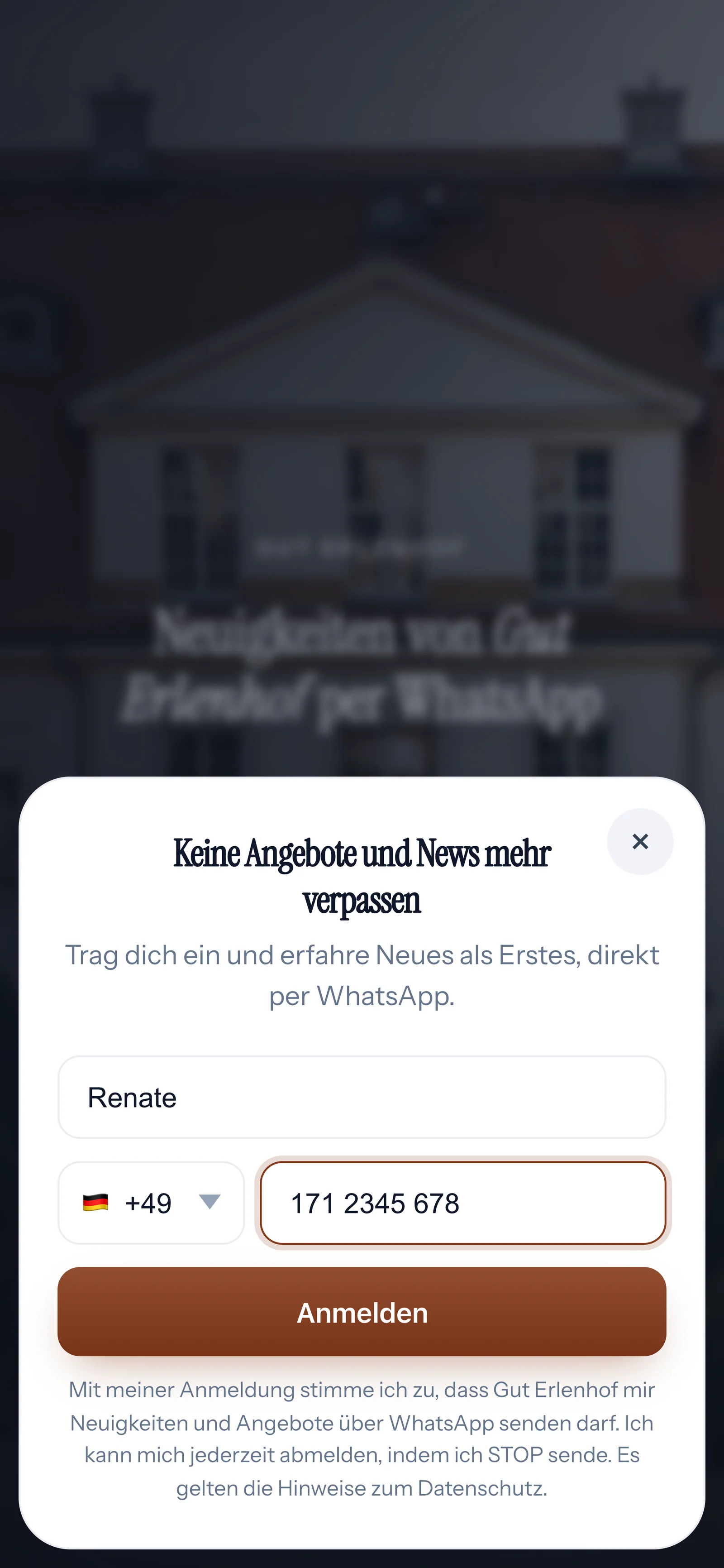
Every button on the page opens the sign-up. Your prospect only enters a first name and phone number.
- 3
Your contact confirms in WhatsApp
SmartChat immediately sends the confirmation message that SmartChat AI wrote during onboarding. After they click Confirm, the thank-you message follows.
 👋 Hello Renate,🌳 great that you want to get news from iPhone with WhatsApp chat from Gut Erlenhof on WhatsApp. Here you will hear about dates that became free, our When a couple cancels, a popular Saturday is suddenly available again. Everyone who was looking for exactly that reads about it the same day. and new events throughout the year.✅ Do you want to receive these messages? Then click the button below: Confirm.🔒 You can unsubscribe at any time. Just write STOP.🧐 You can find our privacy policy at gut-erlenhof.de/datenschutz.18:12ConfirmConfirm18:12🥂 Thank you for your confirmation.🏡 From now on, you will be the first to hear here about free Saturdays, the open house day in March and our New Year's Eve in the banquet hall.18:12
- 4
Your prospect becomes a contact
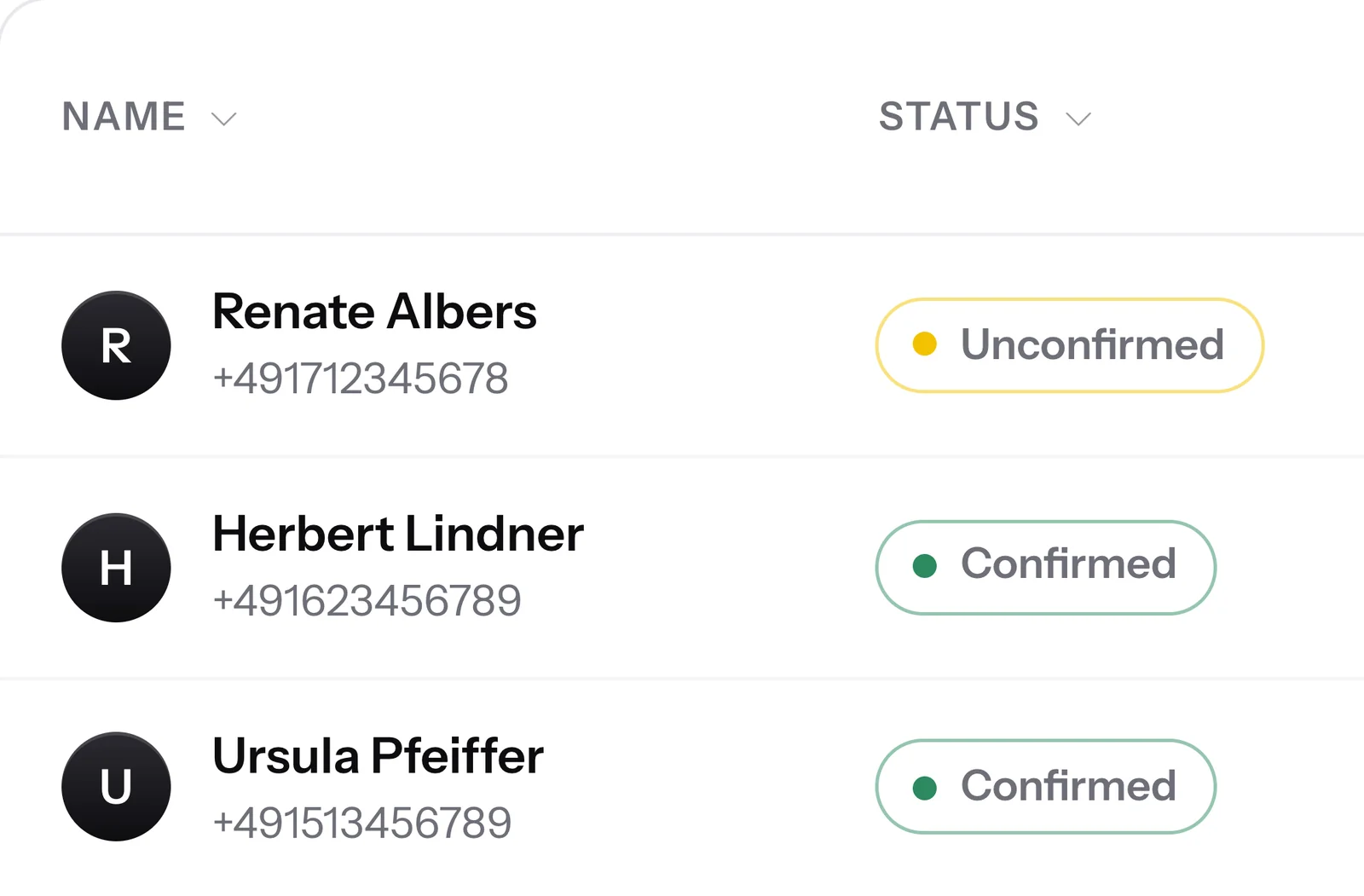
Until they confirm, your prospect stays Unconfirmed. After that, they are a confirmed contact and receive your newsletter.
Your own SmartChat domain.
Every landing page gets a free SmartChat subdomain. You can of course also connect your own domain at any time, and the QR code is created for you immediately.

For everything printed
Flyer, notice or poster: one scan opens the sign-up.
Several links
Connect several domains to your landing page. Every link opens the same sign-up, whether in your Instagram profile, in your signature or on your invoice.
On your website too
The website popup invites visitors to your website to join your WhatsApp newsletter.
Legal texts linked, ads measured.
You enter the links to your legal notice and privacy policy once. With tracking from Meta, Google or TikTok, you see which ad brings you new contacts.

Your texts stay yours
SmartChat links to the legal texts on your website and doesn't write its own.
Just enter the ID
You copy the Pixel ID from Meta, Google or TikTok. You don't have to build any code into the page.
Statistics even without tracking
Visitors, sign-ups and sign-up rate are tracked by SmartChat by default.
Which plan do you need for your landing page?
Every plan includes a landing page. Only buying a new domain is possible from Starter. All prices plus VAT.
| Free | Starter | Basic | Pro | |
|---|---|---|---|---|
| Price per month | 0 € | 299 € | 499 € | 999 € |
| Landing page with double opt-in | yes | yes | yes | yes |
| Domain on smartchat.marketing | yes | yes | yes | yes |
| Connect your own domain | yes | yes | yes | yes |
| Buy your own domain | no | yes | yes | yes |
| QR code and tracking | yes | yes | yes | yes |
| Contacts | unlimited | unlimited | unlimited | unlimited |
Frequently asked questions about landing pages.
How much does the SmartChat landing page cost?
The landing page is included in every plan, even in Free for €0 with no time limit and no credit card. You can connect your own domain in every plan, and you can buy a new domain from Starter for €299 per month, all prices plus VAT.
What does WhatsApp cost at Meta?
For the landing page itself, you pay Meta nothing. Meta only charges for the WhatsApp messages you send, directly to you. For this, you add a payment method in your Meta account.
Do I need my own domain for the landing page?
No, every landing page gets a free domain on smartchat.marketing, for example backhaus-sommer.smartchat.marketing. You can find everything about the free domain under SmartChat domain.
Do I already need a WhatsApp number for onboarding?
No, your website and your email address are enough for onboarding. You connect your WhatsApp number afterwards, and only then does SmartChat send on your behalf: Connect WhatsApp number.
What does SmartChat AI analyze on my website?
SmartChat AI analyzes your website and saves your offer, your prices and how you speak to your customers. It also takes over your logo, your colors and your images.
What happens if SmartChat AI cannot analyze my website?
Then you enter a different website or answer a few short questions about your business instead. You upload a price list, brochure or photos as a PDF or image.
Will SmartChat AI analyze my website again later?
Yes, if you ask SmartChat AI in the chat . If your offer changes, you simply tell it, and it analyzes your website again.
Which businesses is the landing page suitable for?
For every business that wants to collect new contacts for its WhatsApp newsletter, for example a bakery, a yoga studio or an event venue. SmartChat AI adapts texts, images and colors to your business.
How do I change my landing page?
You click Customize and write in your own words what should change, for example "Make the button sage green". SmartChat AI changes colors, titles, texts, images, fonts and building blocks and shows you every change right away.
Can I use my own logo and images?
Yes, you upload your logo as PNG, JPG, SVG or WebP and images as PNG, JPG or WebP. Without a logo, your company name appears at the top left of the page.
Can I change the domain of my landing page?
Yes, you choose a new SmartChat domain made of lowercase letters, numbers and hyphens. If you connect your own domain, your SmartChat domain keeps working.
Does SmartChat write my legal notice or privacy policy?
No, SmartChat links the texts that are on your own website in the footer of the landing page. You are responsible for the content of your legal texts, so ask your lawyer about this.
Can I add the Meta Pixel or Google?
Yes, you enter the ID of the Meta Pixel, Google Tag, Google Tag Manager or TikTok Pixel. Then you see in your ad account who visits your page and signs up.
When does a new contact receive my newsletter?
Only after they have clicked Confirm in WhatsApp. Until then, they stay Unconfirmed in your contacts and do not receive a newsletter.
How does a contact unsubscribe again?
Anyone who has confirmed your newsletter writes STOP in the WhatsApp chat. From then on, SmartChat sends them nothing more, and in your contact list they appear as unsubscribed.
Your landing page. Online in 60 seconds.
Enter your website and SmartChat AI builds your landing page in 60 seconds, with a confirmation message and a thank-you message for WhatsApp.