Tracking for your landing page.
In SmartChat, add the pixel from Meta, Google or TikTok and see in your ad account which ad brings you new WhatsApp subscribers.

From the ad to the subscriber.
This is how a signup with tracking works. Every step runs automatically.
Click on the ad
A prospect sees your ad on Instagram, Facebook, Google or TikTok and clicks on it.
Sign-up form
On your landing page, the prospect signs up for your WhatsApp newsletter.
Ad account
Your landing page reports the signup to Meta, Google or TikTok right away. There you see which ad brought this signup.
WhatsApp
SmartChat sends the confirmation message via WhatsApp. With the click on Confirm, the prospect becomes a subscriber.
This is how you add your pixel.
You copy an ID and paste it in. You don't have to add any code to your page.
- 1
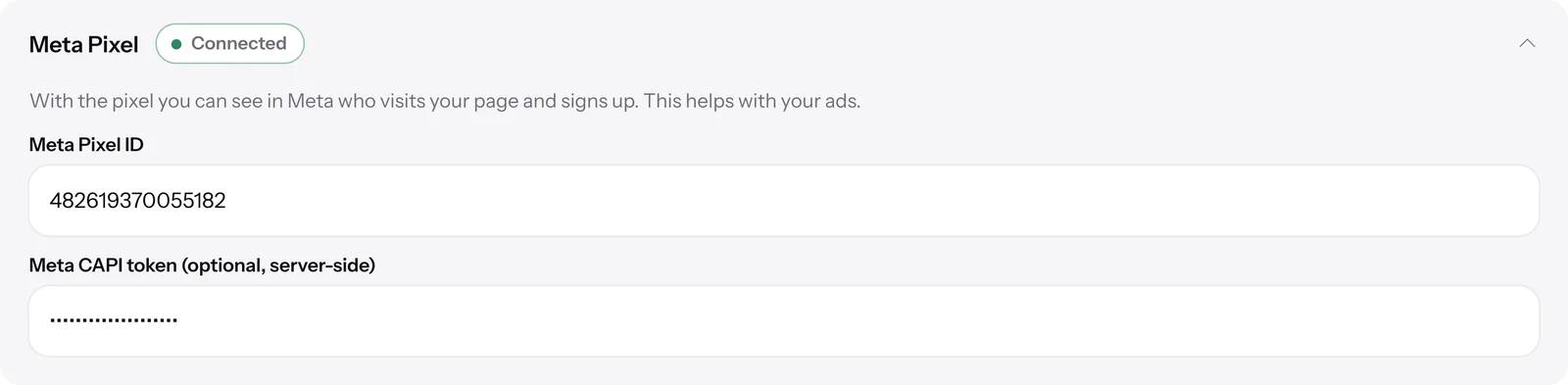
Paste the ID
Copy your pixel ID from your ad account and paste it into SmartChat in your landing page.
- 2
Or write to SmartChat AI
Just write your ID in the chat with SmartChat AI. It adds the pixel for you.

- 3
Active immediately
From the moment you save, your landing page reports every signup to your ad account.
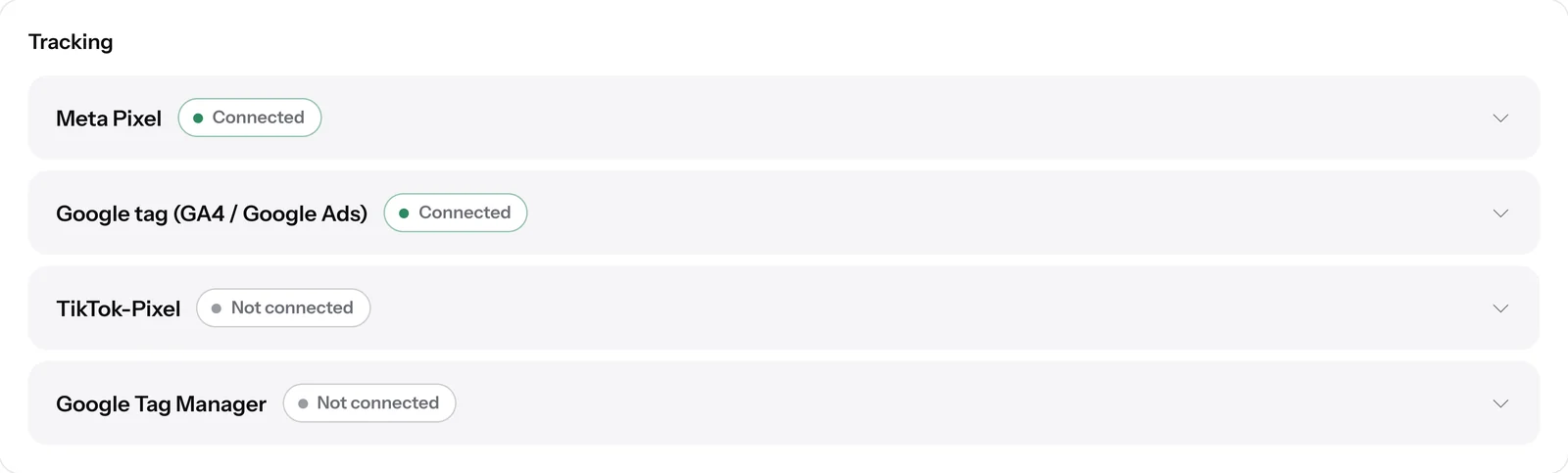


You connect these four services.
Your landing page reports every signup to all the services you have connected. You can use all four at the same time.
| Meta | TikTok | Tag Manager | ||
|---|---|---|---|---|
| What you enter | Pixel ID | Google tag ID | Pixel ID | Container ID |
| Reports every signup | yes | yes | yes | yes |
| Reports despite ad blocker | with token | no | with token | no |
See which ad pays off.
In your ad account, next to every ad, you see how many signups it brought. That way you spend your ad budget on the ads that bring you subscribers.
- 64Birthday
- 41Company party
- 27New room
- 12Voucher
You also see your statistics without a pixel.
For your landing page, SmartChat counts visitors and signups itself. You only need the pixel so that your ad account assigns every signup to the right ad.

Visitors and signups
You see how many people opened your page and signed up, even if someone declines cookies.
In comparison
Next to every number, you see how it changed compared with the previous period.
Only real visitors
Each visitor counts at most once a day. Your own visit from SmartChat doesn't count.
In which plan is tracking included?
Tracking is included in every plan and costs no credits. The plans differ in messages, credits and team seats. All prices plus VAT.
| Free | Starter | Basic | Pro | |
|---|---|---|---|---|
| Price per month | 0 € | 299 € | 499 € | 999 € |
| Meta, Google, TikTok, Tag Manager | yes | yes | yes | yes |
| Reports despite ad blocker | yes | yes | yes | yes |
| Cookie notice | yes | yes | yes | yes |
| Messages | 100 one-time | 3,000 per month | 6,000 per month | unlimited |
Frequently asked questions about Tracking.
What does a tracking pixel do on my landing page?
A pixel is a small piece of code from Meta, Google or TikTok. It tells your ad account who visits your landing page and signs up. In SmartChat you only enter the ID, and SmartChat adds the code for you.
Where do I find my Meta pixel ID?
The Meta pixel ID is in Meta Events Manager under Data sources. You copy this number into SmartChat.
Where do I find my Google tag ID?
The Google tag ID is in your Google account, in Google Analytics or Google Ads.
For which businesses is tracking worth it?
For every business that runs ads and wants to win new WhatsApp subscribers with them. You'll find examples under WhatsApp marketing for escape rooms, WhatsApp marketing for education providers and WhatsApp marketing for loan brokers.
Can SmartChat AI add the pixel for me?
Yes, just write your ID to SmartChat AI in the chat. It checks the format and adds the pixel. If the ID is wrong, it changes nothing and tells you what is missing.
What happens if I enter a wrong ID?
Then SmartChat saves nothing and tells you exactly what is missing. For Meta, for example, it says the pixel ID doesn't match. You'll find it in Meta Events Manager under Data sources.
Do I need a cookie notice for tracking?
SmartChat adds the cookie notice automatically as soon as you use a pixel. The pixel only loads after consent. Whether that is legally enough in your case is something you clarify with your lawyer.
What happens if a visitor declines the cookies?
Then no pixel loads, and neither the browser nor the server reports anything to Meta, Google or TikTok. They can still sign up, and the signup counts in your statistics in SmartChat.
What do I need the CAPI token from Meta for?
With the token, SmartChat also reports every signup directly from the server to Meta. That way it arrives even if an ad blocker stops the pixel in the browser. The token is optional, and for TikTok there is the Events API token.
Does Meta count a signup twice if I use the pixel and the token?
No, browser and server send the same event number. Meta and TikTok use it to recognize that it is the same signup and count it only once.
Can I see in SmartChat which ad brought a contact?
No, you see that in your ad account at Meta, Google or TikTok. In SmartChat you see visitors, signups and the signup rate of your landing page for the period you choose. Clicks on link buttons in your messages are counted by link click tracking.
How do I remove a pixel again?
You empty the field with the ID and save. SmartChat then reports that the pixel is removed, and the service shows Not connected again.
What does tracking cost in SmartChat?
Tracking is included in every plan, in Free for €0 too, and costs no credits. The paid plans start at €299 per month plus VAT.
What does the pixel cost at Meta, Google or TikTok?
The pixel itself costs nothing at these services. You pay for your ads directly in your ad account, not at SmartChat.
Track every sign-up.
Enter your website. In 60 seconds your landing page is ready, then you enter your pixel ID, and every signup lands in your ad account.