

Skip to content

WhatsApp marketing for recruiters.

With SmartChat, you send your candidates on WhatsApp everything that moves their job search forward: new jobs from their region, the invitation to the applicant day or the reminder about their job interview.

New jobs as a WhatsApp newsletter

Phone and coffee on a marble table, image in the newsletter

image

A photo above the jobs makes your message instantly recognizable in the chat. You take an image from your website or upload your own.

👋 Hello Claudia, 📌 these new jobs from the Augsburg area have been with us since Monday. 🧾 Accountant, full-time at a family business in Königsbrunn, starting in January. 🏭 Industrial mechanic in two-shift operation, no night work, at a manufacturer in Neusäß. 📦 Warehouse team lead with six employees at a wholesaler in Bobingen. 🩺 Receptionist for a doctor's practice, mornings only, right in the city center. 👉 You'll find salary and working hours for each offer on our website.
07:30

Text

SmartChat AI summarizes your new job ads. Each job gets its own paragraph, with profession and location in bold.

View all jobs

button

One click leads to all open jobs on your website. There, your candidate finds the salary and the way to apply.

SmartChat gets in touch with applicants automatically.

Welcome, receipt of the application and reminder before the interview at the company: these three messages run without you having to think about them. The thank-you after sign-up runs in every plan, your own automations are available from Basic.

As soon as a candidate confirms

Two people shaking hands over a desk signifies a business agreement or partnership.
✅ Your registration with us is complete.🔎 We place skilled workers and office staff with companies in the Augsburg area, from skilled trades to administration.📲 Here you will hear about new jobs, applicant days and your appointments with companies.📄 To get started, we need your current résumé. Upload it using the button below.🔒 We pass your documents on only with your consent to an employer.18:20
Upload résumé

Welcome after signup

Once someone has signed up and confirmed, SmartChat immediately sends a welcome. With the link through which they upload their résumé.
As soon as an application comes in
Detailed view of a CNC laser engraver focusing on precise metalwork.
👋 Hello Peter,📥 your application as Industrial mechanic it's arrived.👀 Your contact person is looking through your documents by Friday in peace.📞 After that, we'll get in touch for a short introduction by phone.❓ Do you have questions about the job beforehand? Write them right here in the chat.21:04

Application received

If your applicant management can report new applications to SmartChat, the candidate gets a receipt confirmation on WhatsApp right away.

1 day before the job interview
A sleek reception desk featuring a snake plant, glassware, and tech gadgets for a contemporary feel.
👋 Hello Karin,📅 tomorrow at 10 am is your job interview as Purchasing Clerk.🙋 The Head of Purchasing will meet you right at reception on the ground floor.📂 Bring your most recent certificates with you, printed out or on your tablet.🅿️ Visitor parking is signposted next to the main entrance.📲 Right after the interview we will call you to hear how it went.15:00
Open address

Reminder before the job interview

SmartChat takes the appointment from your calendar and reminds your candidate the day before. They then know where to go and what to bring.

This is how you collect contacts from candidates.

Candidates sign up themselves: through the QR code in your shop window, on your online job board, or through a link under your ads. Only people who then agree themselves in WhatsApp get messages.

  1. 1

    Your candidate scans the QR code

    The code hangs next to your job postings and is on your flyer for the job fair. You get it from SmartChat, and it leads to your landing page.

  2. 2

    Your candidate enters their first name and phone number

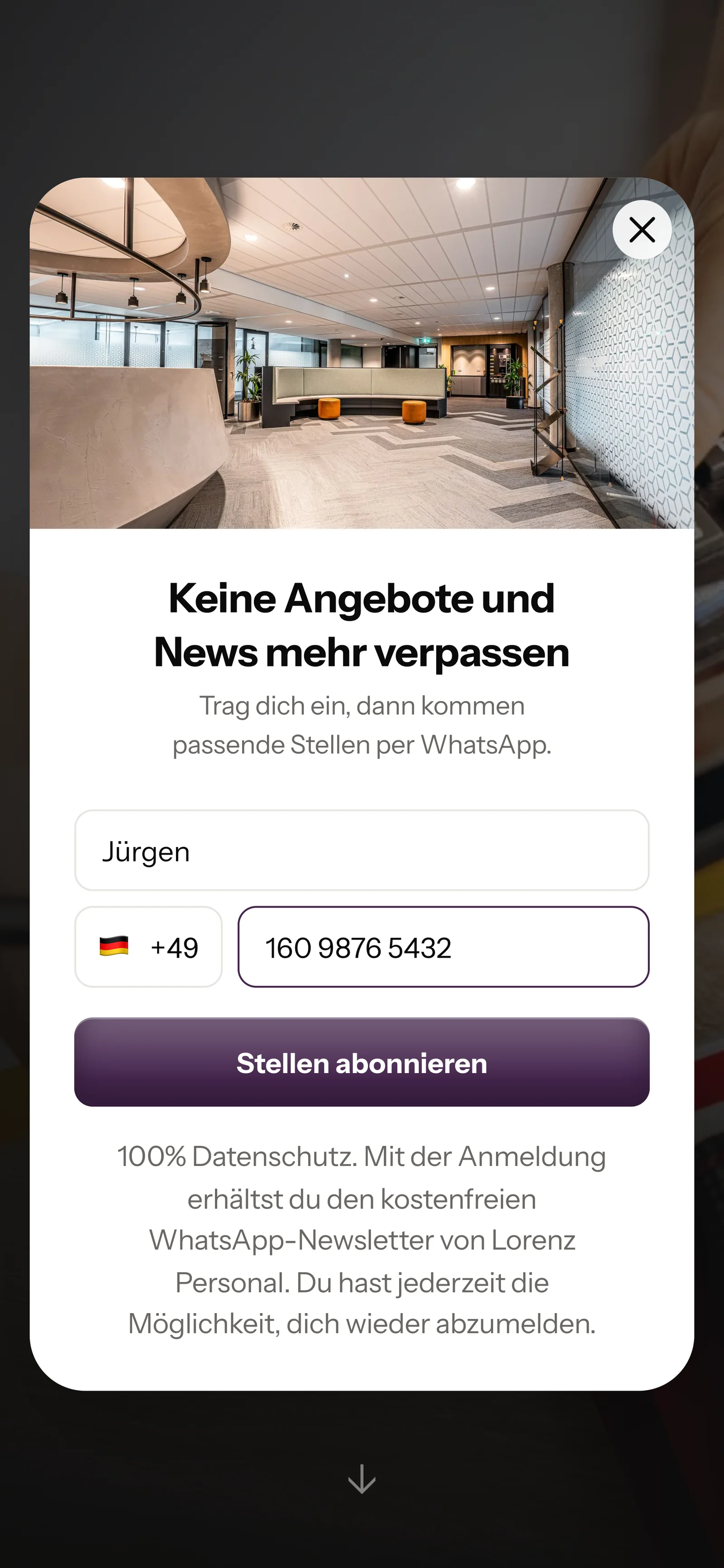
    Anyone who looks at your open jobs online sees a small window. It asks for nothing more.

    Real website popup from Lorenz Personal with a photo at the top, mobile view: headline Never miss offers and news again, first name Jürgen and phone number entered, button Subscribe to jobs
  3. 3

    Your candidate confirms in WhatsApp

    They click Confirm once. This double opt-in means: every candidate agrees themselves in WhatsApp before they get jobs from you.

    👋 Hello Jürgen,💼 here you get new jobs from your region, invitations to applicant days and info about your appointments.✅ Do you want to receive these messages? Then click the button below: Confirm.🔒 You can unsubscribe at any time. Just write STOP.08:47
    Confirm
    Confirm08:47
  4. 4

    You have the proof

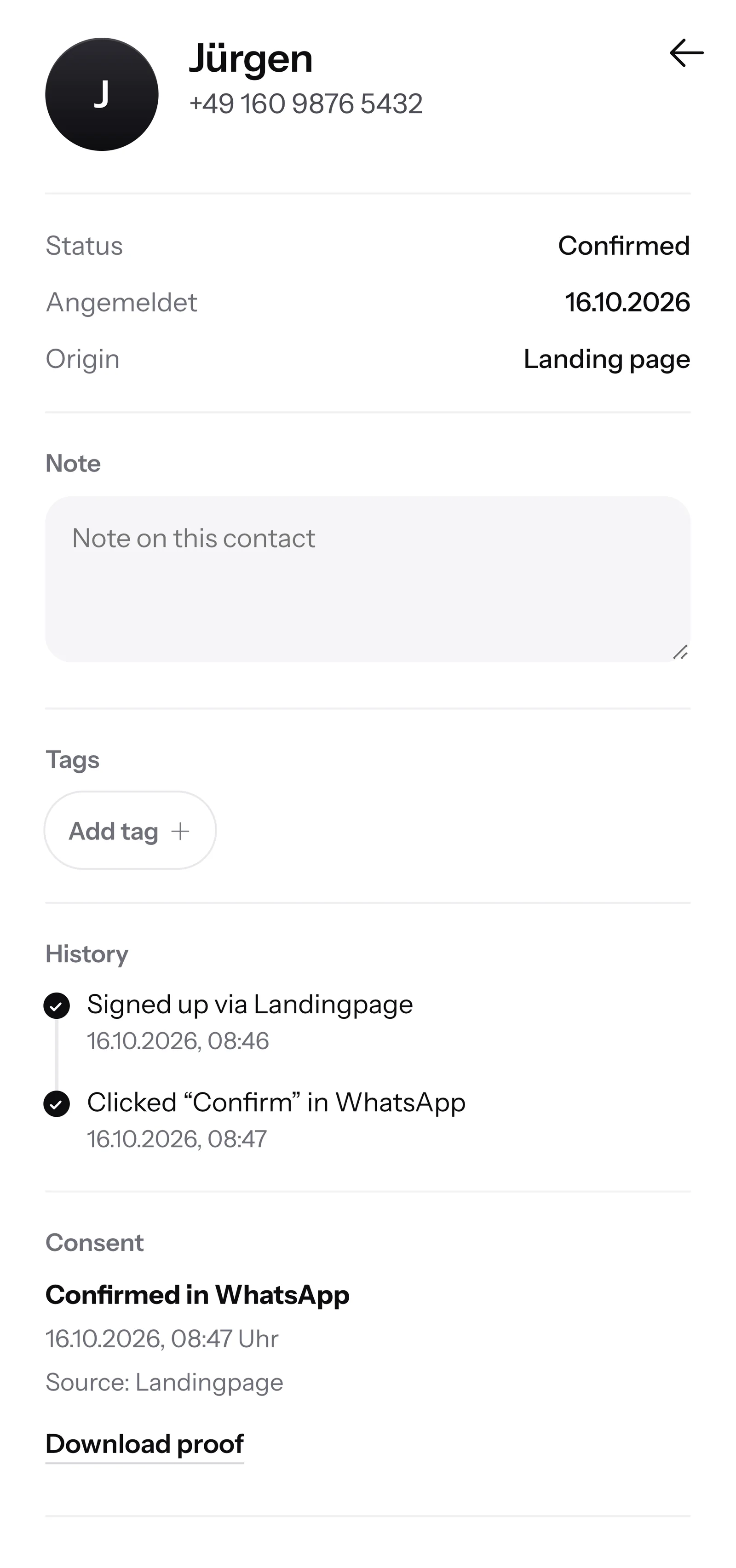
    SmartChat records when and how your candidate agreed. You can download the proof as a PDF at any time.

    Contact Jürgen in SmartChat, mobile view: status Confirmed, signup history, consent confirmed in WhatsApp and button Download proof

SmartChat AI answers your candidates.

When a candidate writes in the evening and nobody in your office can be reached anymore, SmartChat AI replies fully automatically for you. She answers with the knowledge she has learned from your website and your documents. If she has no source, she hands over to you.

Inbox in SmartChat: SmartChat AI answers the WhatsApp question of a customer of Lorenz Personal
  • Also after closing time

    Anyone who writes after their shift gets an answer right away, even if your office closed long ago.

  • In every language

    SmartChat AI replies in the language your candidate writes in. Skilled workers from abroad understand the message right away.

  • Your recruiter takes over

    If SmartChat AI cannot answer, for example with a salary request, the message is passed on to your team in the inbox.

Frequently asked questions about WhatsApp marketing for recruiters.

Can I simply message candidates from my applicant file on WhatsApp?

Not just like that. Only people who have confirmed get your WhatsApp newsletter. You can import candidates from your database as a file. They are unconfirmed at first and only get the newsletter after confirming: either by clicking the confirmation message or with proof. You can also invite them to sign up through your landing page . SmartChat saves for every contact when they agreed.

How do I reach the candidates who are already in my file?

Put the link to your landing page everywhere you talk with candidates: in your signature, under every job ad and on your business card. Whoever signs up and confirms gets your jobs on WhatsApp from then on. You can also import them via a file. They only get the newsletter after confirming.

Is SmartChat an applicant management system for my recruiting agency?

No. You keep managing résumés, profiles and placements in your current software. SmartChat sends your WhatsApp messages and collects all conversations with candidates in one inbox. If your applicant management can report new applications via webhook, SmartChat automatically sends a receipt confirmation.

Can I send a job only to candidates with a matching profession?

Yes. You give your contacts tags, for example accounting, warehouse or electrics, and build segments from them. You then send a new job for electricians only to the electrics segment.

What applies to data protection when applicants write to me on WhatsApp?

SmartChat supports you with consent that complies with data protection rules: every candidate confirms themselves, and you have the proof as a PDF. How long you keep applicant data and when you pass it on to a company, you clarify with your data protection officer. This answer is not legal advice.

Do I have to write the texts for my jobs myself?

No. SmartChat AI writes the newsletter from your job ads, with profession, location and working hours. You read the text, change it if needed and send it with one click.

How does SmartChat AI know my open jobs?

SmartChat AI analyzes your website with the job board and all documentsyou upload, for example a job description as a PDF. Once a job is filled, you take it off the website or delete the document. After that SmartChat AI no longer mentions it.

What happens if SmartChat AI can't answer a question about the job?

Then the question stays in the inbox, and your recruiter replies themselves. Once a person has replied to a message, SmartChat AI writes nothing more on that message.

Does SmartChat AI also reply to skilled workers from abroad?

Yes, in the language the worker writes in. If a nurse from Spain asks about the job in Spanish, she gets the answer in Spanish.

Can all recruiters in my office reply too?

Yes. All conversations end up in a shared inbox, and each recruiter answers their candidates there. In the team , Free has 1 seat, Starter 3, Basic 6 and Pro 12.

What does SmartChat cost for a recruiting agency?

Free costs 0 €, with no time limit and no credit card, with 100 messages one time. Starter costs 299 € a month with 3,000 messages, Basic 499 € with 6,000 and Pro 999 € with unlimited messages. Sending costs no credits. All prices plus VAT, more at Pricing.

What fees does Meta charge when I send jobs on WhatsApp?

Meta is the company behind WhatsApp and bills you directly for the message fees. For that you add a payment method in your Meta account. You pay SmartChat only for your plan. You can find the exact prices here.

How many automations can my recruiting agency use?

Free and Starter include 1 automation, the fixed double opt-in for new contacts. Basic has 3, of which 1 is double opt-in, Pro has unlimited. Custom automations like the reminder the day before the job interview are available from Basic.

How quickly can my recruiting agency get started with SmartChat?

You give SmartChat AI the address of your website. In 60 seconds, your WhatsApp marketing system is ready with landing page and QR code. Then you connect your phone number, confirm it with the code from Meta and send your first jobs.

How does a candidate unsubscribe from my jobs on WhatsApp?

They write STOP in the chat with your recruitment agency. From then on SmartChat no longer sends them newsletters, and in your contact list they show as unsubscribed.

WhatsApp marketing for your recruitment agency in 60 seconds.

SmartChat AI analyzes your website and builds your landing page with QR code and the popup for your job board in 60 seconds. Free costs 0 € and needs no credit card.