


Thank-you after sign-up
Anyone who signs up and confirms immediately gets a short greeting from your shop.

With SmartChat you send your customers on WhatsApp what you want to tell them: the bouquet of the week, the first peonies of the season or the reminder to pre-order for Mother's Day.


Thank-you, order confirmation and appointment reminder: you don't have to type them. SmartChat sends them at the right moment, even when you're standing at the arranging table. Custom automations are available from Basic.

Anyone who signs up and confirms immediately gets a short greeting from your shop.

If your order system reports a new order to SmartChat, the confirmation goes to your customer by WhatsApp immediately.

If a consultation for table decorations or a bridal bouquet is in your calendar, SmartChat reminds your customer the day before.
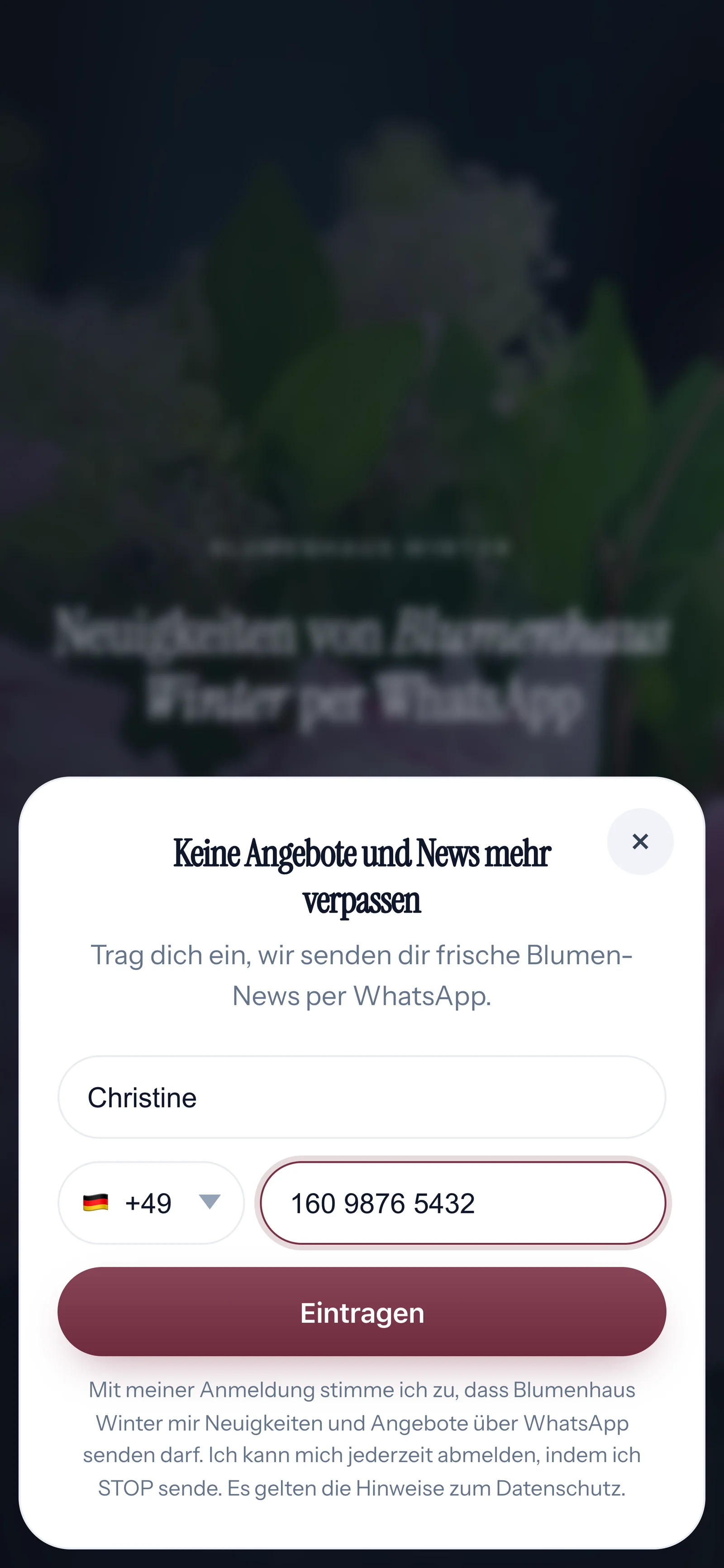
Your customers sign up themselves: via the QR code on the card on the bouquet, on your website or via a link. They only get your newsletter once they have confirmed in WhatsApp.
The code hangs on the card attached to every bouquet, and it's on a small stand in the shop. SmartChat creates it to match your landing page.
A window opens with exactly these two fields.

They click Confirm once. That's double opt-in: only this consent of their own allows you to send them your newsletter.
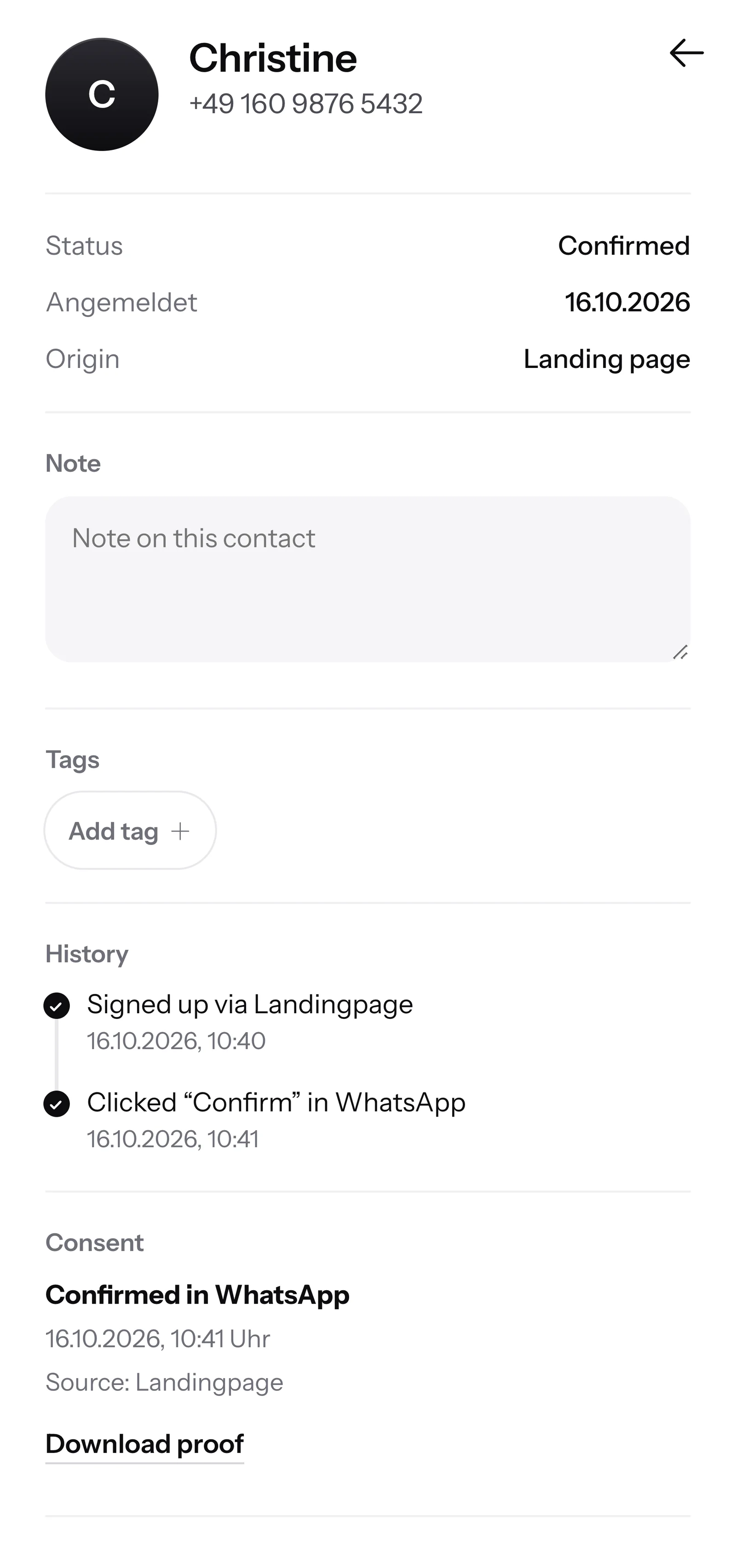
SmartChat shows when and via which route your customer agreed. You download the proof as a PDF.

If a customer writes but nobody in your shop can be reached anymore, SmartChat AI answers fully automatically for you. It answers with the knowledge it has learned from your website and your documents. If it has no source, it hands over to you.

If someone writes after closing time, they get an immediate answer to their questions.
SmartChat AI answers in the language your customer wrote in. Every customer understands the message right away.
If SmartChat AI is missing some information, the question stays in the inbox, and someone from your shop answers.
No, only after they have agreed. Your customer signs up themselves, via the QR code, your website or a link, and then confirms in WhatsApp. SmartChat records this consent with date and time for you.
Where your customers already look: in the shop window, at the arranging table or on the little card on the bouquet. SmartChat creates the code for your landing page, and you print it as often as you like. On your website, an additional small popupasks whether visitors want to sign up.
Yes. Your newsletter can have an image or video at the top. You upload a photo of your bouquet or take one from your website. Below it come the text and a button to your website.
No, SmartChat is not an ordering system or a cash register. If a customer writes to you on WhatsApp about which bouquet they want, the message lands in SmartChat's inbox. There you or your team confirm the order directly in the chat.
Yes. You write the newsletterwhen things are quiet in the shop, and you set the day and time for sending. SmartChat then sends it at the planned time to all subscribers.
SmartChat AI analyzes your website and the documentsthat you upload, for example a price list as a PDF. If prices or delivery times change, you upload the new list, and SmartChat AI answers with it from then on.
If SmartChat AI doesn't know the answer, the question stays in the inbox for you. You or your team then answer yourselves. As soon as a human has written in the conversation, SmartChat AI holds back on that message.
Yes, in the language your customer writes in. If someone orders a bouquet for a friend in Italian, they get the answer in Italian.
Yes. All WhatsApp chats come together in a shared inbox, and everyone on the team sees what has already been answered. Free has 1 team seat, Starter 3, Basic 6 and Pro 12.
No, you use your shop's number. You connect it once with SmartChat and confirm it with a code from Meta, the company behind WhatsApp. One account has exactly one number.
Free costs β¬0, with no time limit and no credit card, with 100 messages one-time. Starter costs β¬299 per month with 3,000 messages, Basic β¬499 with 6,000 and Pro β¬999 with unlimited. You pay no credits for sending. All prices plus VAT, more under Pricing.
Meta bills you directly for the fees for WhatsApp messages. For this, you add a payment method in your Meta account. You pay SmartChat only for your plan. You can find the exact prices here.
Free and Starter include only the fixed automation for new contacts (confirmation and thank-you). Custom automations are available from Basic: Basic has 3, 1 of them fixed, Pro unlimited. A custom automation sends automatically, for example the reminder the day before a consultation.
You give SmartChat AI your website address. In 60 seconds, your landing page, QR code and your WhatsApp marketing system are ready. Then you connect your number and send the first bouquet of the week.
Anyone who has confirmed your newsletter writes STOP in the WhatsApp chat with your flower shop. From then on, SmartChat sends them nothing and marks them as unsubscribed in your contact list.
SmartChat AI analyzes your flower shop's website. After 60 seconds, you have your landing page and the QR code. Free costs β¬0 and needs no credit card.