Create and send a WhatsApp newsletter.
You write your idea, SmartChat AI creates the newsletter and sends it by WhatsApp to your confirmed contacts.

This is how a WhatsApp newsletter is built.

Header
At the top there can be an image or video, which SmartChat takes from your website or which you upload yourself. A document works too, but we don't recommend it.
Text
SmartChat AI writes it to fit your business. The important parts are in bold.
button
With one click, your subscriber opens your offer. Link clicks are tracked.
This is how your newsletter.
You write your idea, SmartChat does the rest.
Write your idea
Write in the chat with SmartChat AIwhat it's about, for example your new offer.
SmartChat AIGet a draft
SmartChat AI builds the header, text and button. You ask for changes with one message.
Header, text, buttonTest send
With a test send to your own number, you see the newsletter exactly as your subscribers do.
Test sendSend or schedule
You choose the recipients and send right away or automatically at the time you want.
Sending
The newsletter arrives directly in WhatsApp with your contacts.
Next to family and friends
Your newsletter appears in WhatsApp among the chats your contacts open every day.
With header, text and button
At the top, an image or video if you like, below it your text and a button that leads straight to your offer.
Reply with one click
Anyone with a question writes straight back. You get the reply in the inbox.
You decide who gets the newsletter.
Send to all confirmed contacts or only to contacts with certain Tags or sources. Before sending, you see how many recipients there are.

Tags for every audience
A new offer goes only to contacts with the matching tag, for example the vegetarian autumn menu only to contacts with the tag Vegetarian.
Only with consent
Only contacts who have confirmed in WhatsApp appear in the selection.
Personalization
Every subscriber gets the newsletter with their own first name.
Only those who have agreed get newsletters from you.
Your subscribers sign up themselves and confirm in WhatsApp via Double opt-in. They can unsubscribe at any time with a short message.
- 1
Your prospect signs up
On your website, the Website popupopens. One click, and your contact has signed up for the newsletter.
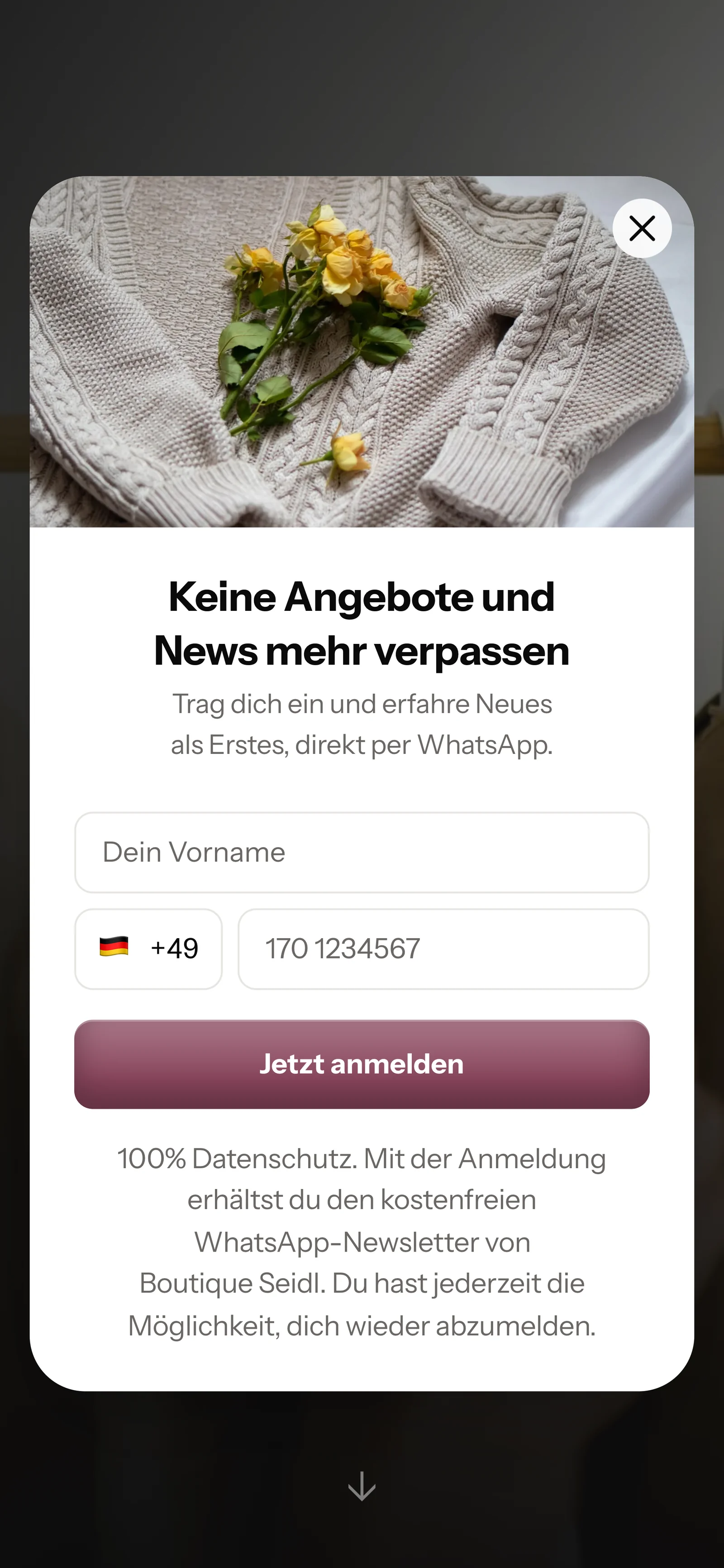
- 2
Your contact confirms
SmartChat sends a confirmation message by WhatsApp. Only after they click Confirm can you send them newsletters and Follow-ups . This process is called double opt-in and runs fully automatically.
👋 Hello Gabriele,👗 great that you want news from Boutique Seidl via WhatsApp.🧥 Here we show you new goods, let you know about restocks in your size and invite you to our shopping evenings on.✅ Do you want to receive these messages? Then click the button below: Confirm.🔒 You can unsubscribe at any time. Just write STOP.19:42ConfirmConfirm19:42 - 3
You have the proof
For every contact, SmartChat stores when and how they agreed, as proof of consent to download.

- 4
Unsubscribe with STOP
Anyone who has confirmed your newsletter can unsubscribe at any time with STOP. From then on, SmartChat sends them nothing. In your contact list, they appear as unsubscribed.
STOP18:40You are unsubscribed and won't receive any more messages from us. Write START if you'd like to be part of it again.18:40
You see every send live.
While the newsletter is being sent, SmartChat shows how many have already been sent and read. You can pause a sending in progress at any time with one click.

Pause and resume
With one click on Resume, sending continues where it was paused.
SmartChat gets your messages approved.
by Meta. SmartChat sends messages outside the inbox as a template approved by Meta, and SmartChat submits it for you.

Checked beforehand
SmartChat checks the text itself against Meta's rules before it is submitted.
Status always visible
For every newsletter, you see whether it is being reviewed, ready to send or rejected.
Replies without a template
If you reply to a contact in the inbox within 24 hours, you don't need a template.
Plan your Newsletter in advance.
You choose the day and time, and SmartChat starts sending automatically at the chosen time, even when your computer is off.

Every message lands in the inbox.
If a subscriber asks a follow-up question about your newsletter, SmartChat AI replies right away. It answers with the knowledge it has learned from your website and your documents. You read along and write yourself whenever you like.

Even in the evening
If a contact writes after closing time, they still get an immediate reply.
In every language
SmartChat AI recognizes the language of the incoming message and replies in that language.
Your team takes over
If SmartChat AI can't answer, the message is forwarded to your team in the inbox.
What does the sending cost??
Sending costs no credits in SmartChat. You only pay for your plan: Free 0 €, Starter 299 €, Basic 499 € and Pro 999 € per month, all prices excl. VAT. Meta's fees come on top. You pay them directly to Meta, and SmartChat adds nothing on top. You'll find the current prices under Meta fees.
| Free | Starter | Basic | Pro | |
|---|---|---|---|---|
| Price per month | 0 € | 299 € | 499 € | 999 € |
| Messages | 100 one-time | 3,000 per month | 6,000 per month | unlimited |
| Contacts | unlimited | unlimited | unlimited | unlimited |
| Schedule a newsletter | yes | yes | yes | yes |
| AI reply in the inbox | yes | yes | yes | yes |
Frequently asked questions about WhatsApp newsletter.
Can I send a WhatsApp newsletter to anyone whose number I have?
No, a WhatsApp newsletter only goes to contacts who have agreed beforehand. That's why SmartChat only sends it to contacts who signed up themselves and confirmed in WhatsApp. This process is called Double opt-in, and SmartChat stores the proof of consent.
How does a contact unsubscribe from the WhatsApp newsletter?
Anyone who has confirmed your newsletter writes STOP in the chat. From then on, SmartChat sends them nothing more and shows them in your contact list as unsubscribed.
What does it cost to send a WhatsApp newsletter?
What does WhatsApp cost at Meta for my newsletter?
Meta charges you directly for WhatsApp message fees. For that, you add a payment method to your Meta account. SmartChat adds nothing on top. You'll find the current prices under Meta fees.
How many newsletter messages can I send?
Free includes 100 messages one time, Starter 3,000 per month, Basic 6,000 per month and Pro unlimited. The number of your contacts is unlimited in all plans. You'll find all plans under Pricing.
Do I have to write the text of my newsletter myself?
No, you write in the chat with SmartChat AI only your idea. SmartChat AI writes the text and button to fit your business, and you ask for changes with a message.
Which industries is a WhatsApp newsletter suitable for?
For every business that wants to tell customers about offers and news on a regular basis. You'll find examples under WhatsApp marketing for restaurants, WhatsApp marketing for fashion boutiques and WhatsApp marketing for wineries.
Can I schedule a WhatsApp newsletter for later?
Yes, you choose the day and time in advance, and SmartChat starts sending automatically at the chosen time. Until sending starts, you can cancel the schedule again.
What happens if my allowance isn't enough before the scheduled time?
Then SmartChat puts the newsletter back to draft and tells you why. You schedule it again as soon as enough messages are available again.
Do I have to submit my templates to Meta myself?
No, SmartChat submits every template to Meta for you as soon as your newsletter is ready. For every newsletter, you see whether it is being reviewed, ready to send or rejected.
Can I send a newsletter only to certain contacts?
Yes, you send to all confirmed contacts or only to contacts with certain tags or sources. Before sending, SmartChat shows you how many recipients there are.
Can I stop a sending in progress?
Yes, one click on Pause sending stops it right away. When you resume, sending continues where it was paused.
Can I send images, videos or documents along?
Yes, a header with an image or video can go at the top of the newsletter. A document works too, but we don't recommend it. SmartChat takes images from your website, or you upload your own.
Your first WhatsApp newsletter.
Enter your website. In 60 seconds your WhatsApp marketing system is ready, and your first newsletter is just one message away.