




Welcome after confirmation
Anyone who signs up gets a short introduction to your learning center right after confirming.

With SmartChat you send your students and their parents what's coming up in the school year on WhatsApp: the consultation after report cards, the intensive course before the exam or a holiday course in summer.


Welcome, confirmation of the trial lesson and reminder the day before: SmartChat sends these messages automatically for your learning center, without you having to remember them. The confirmation and the reminder are separate automations from Basic.

Anyone who signs up gets a short introduction to your learning center right after confirming.

If your student management software can report new trial lessons to SmartChat, parents get the confirmation by WhatsApp right away.

SmartChat takes the lessons from your calendar and reminds you the day before. If something comes up, you'll find out in time.
Parents sign up themselves: via the QR code on the registration form, on your website, or through a link in your Instagram profile. You only send them your newsletter once they confirm in WhatsApp.
You attach the QR code to the registration form and hang it next to the door of the learning room. SmartChat creates it for your landing page.
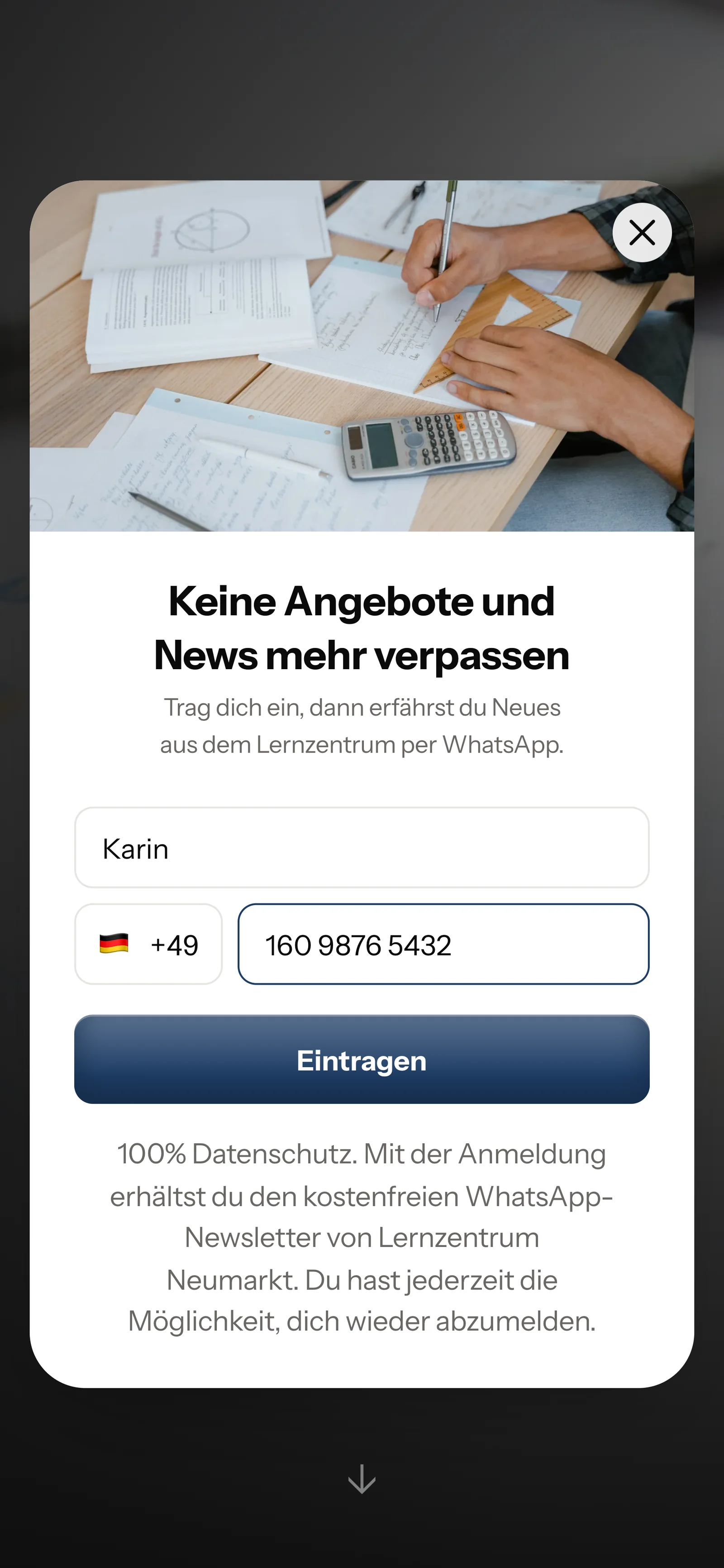
A small window opens on your website and behind the QR code. It only asks for these two details.

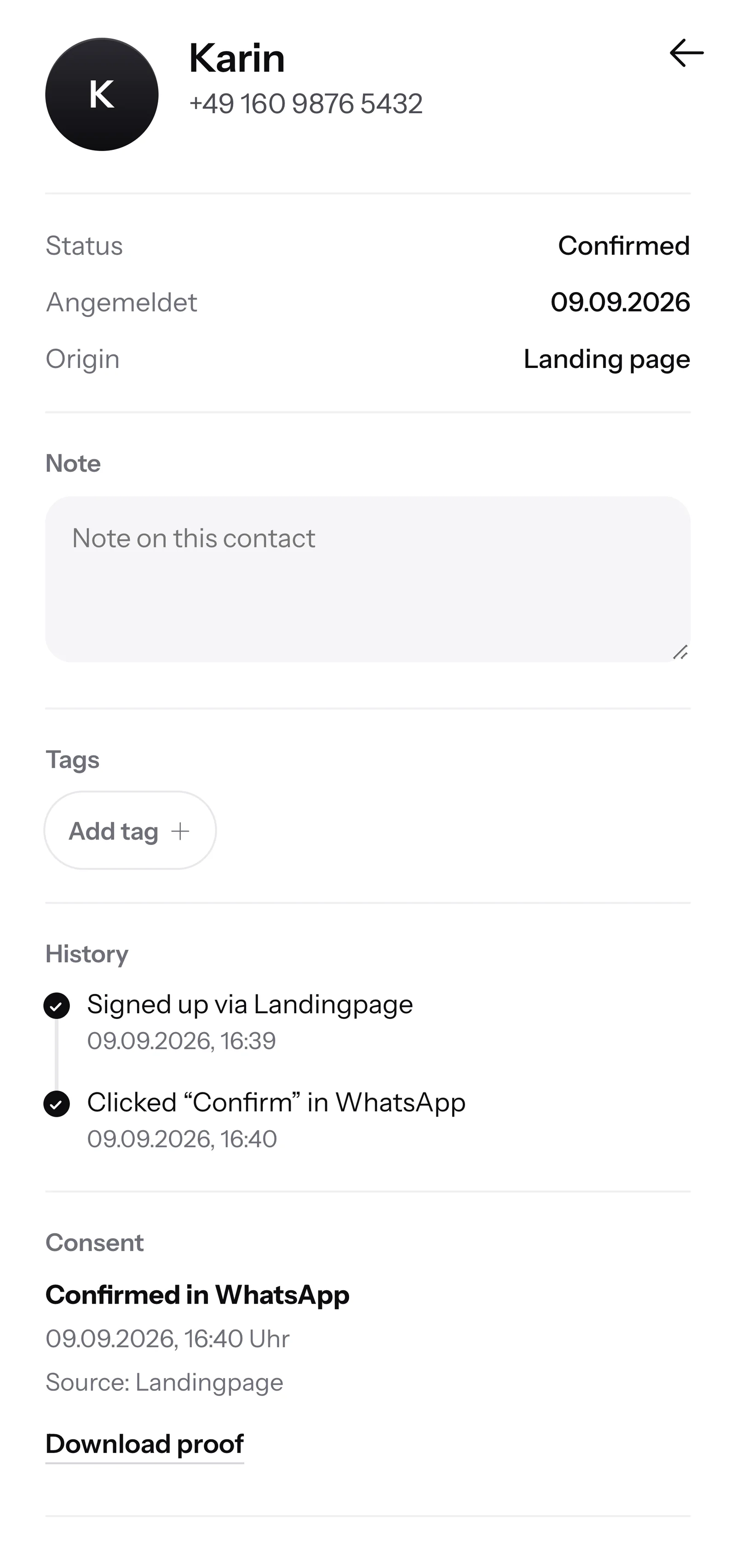
One click on Confirm is enough. That's how the double opt-in works: every contact agrees once themselves in WhatsApp.
SmartChat saves when and where the parents gave consent. You always have the proof ready as a PDF.

When parents write in the evening and nobody at the learning center is reachable anymore, SmartChat AI replies fully automatically for you. It answers with the knowledge it has learned from your website and your documents. If it has no source, it hands over to you.

When parents write after dinner, they still get an answer right away.
SmartChat AI replies in the language the parents write in. Even families who have just moved here understand every message right away.
If SmartChat AI can't answer, the message is forwarded to your team in the inbox.
Yes, once they have agreed. Parents sign up themselves, via the QR code on the registration form, on your website or via a link, and confirm briefly once in WhatsApp. SmartChat saves this consent as proof.
That is a legal question SmartChat can't answer for you. You're on the safe side if the parents sign up and agree. If you want to write to younger students yourself, clear that beforehand with your data protection advisor.
Through your landing page. SmartChat creates a QR code, which you attach to the registration form or hang up in the learning room. On your website, a popup asks visitors whether they want to hear about new courses via WhatsApp.
Yes. You give your contacts tags, for example "final year" or "math". You then send the intensive course before the exam only to this group; everyone else doesn't get it.
No. SmartChat sends and answers WhatsApp messages. You keep planning your lessons in your usual program. If it's connected to a calendar (iCal), SmartChat picks up the appointments and reminds the parents the day before with an automation from Basic.
Yes, a payment reminder is possible as an automation from Basic, if Meta approves the template. For that, your billing software must report unpaid fees to SmartChat, for example via a webhook. You set the text of the reminder yourself beforehand.
SmartChat AI analyzes your website and all the documents you upload under Knowledge & documents , such as your price list or the holiday course schedule as a PDF. When a new subject is added, you upload the new version and the answers are right again.
No, SmartChat AI isn't meant for that. It answers the parents' questions about your learning center. The tutoring itself stays with your teachers.
No. You tell SmartChat AI the topic, for example the German holiday course in the last weeks of August. SmartChat AI writes a newsletter from it that fits your tutoring school. You read it through and send it with one click.
Yes. All WhatsApp conversations come together in one shared inbox. Free has 1 seat for your team, Starter 3, Basic 6 and Pro 12. Teachers get the Employee role. They only see the inbox and settings and reply there to incoming messages.
No. SmartChat sends via the number your parents already know. You connect it once and confirm it with the code from Meta, the company behind WhatsApp. Exactly one number is connected per account.
You start with Free for โฌ0, with no time limit and no credit card, with 100 messages one-time. After that there's Starter for โฌ299 per month with 3,000 messages, Basic for โฌ499 with 6,000 and Pro for โฌ999 with no limit. You pay no credits for sending. All prices plus VAT, more at Pricing.
Meta bills you directly for the fees for WhatsApp messages. For that, you add a payment method in your Meta account. You only pay SmartChat for the plan you choose. You can find the exact prices here.
Anyone who has confirmed your newsletter writes STOP in the chat with your learning center. From then on SmartChat sends them nothing more, and in your contact list the parents appear as unsubscribed.
SmartChat AI analyzes your tutoring school's website and uses it to build your WhatsApp marketing system in 60 seconds, with landing page and QR code. Free costs โฌ0 and needs no credit card.