WhatsAppautomations in SmartChat.
Since 3 September 2026, SmartChat sends WhatsApp messages automatically as soon as the trigger you chose fires, for example after a booking.

One event becomes a WhatsApp message.
Every automation has a trigger followed by its steps.
Trigger
A booking, an appointment in your calendar, a keyword in WhatsApp or a notification from your software.
TriggerWait
If you want, the automation waits minutes, hours or days.
TimingCondition
It only continues if a detail matches.
Only ifoffer
SmartChat sends the WhatsApp message, adds a tag or lets you know.
Automatic
The reminder arrives on its own.
If there's an appointment with a mobile number in your calendar, SmartChat reminds your customer beforehand via WhatsApp.
From your calendar
Google Calendar, Outlook or Apple Calendar via the private iCal address.
24 hours before
That's the default; you change the lead time yourself.
Replies in the inbox
If your customer replies, you read it in the inbox.
Your calendar is connected.
Paste the private iCal address once, and SmartChat picks up new appointments automatically. SmartChat doesn't change anything in your appointments.

You see every step.
When you open an automation, its flow is shown from top to bottom, with the Meta status of every message.
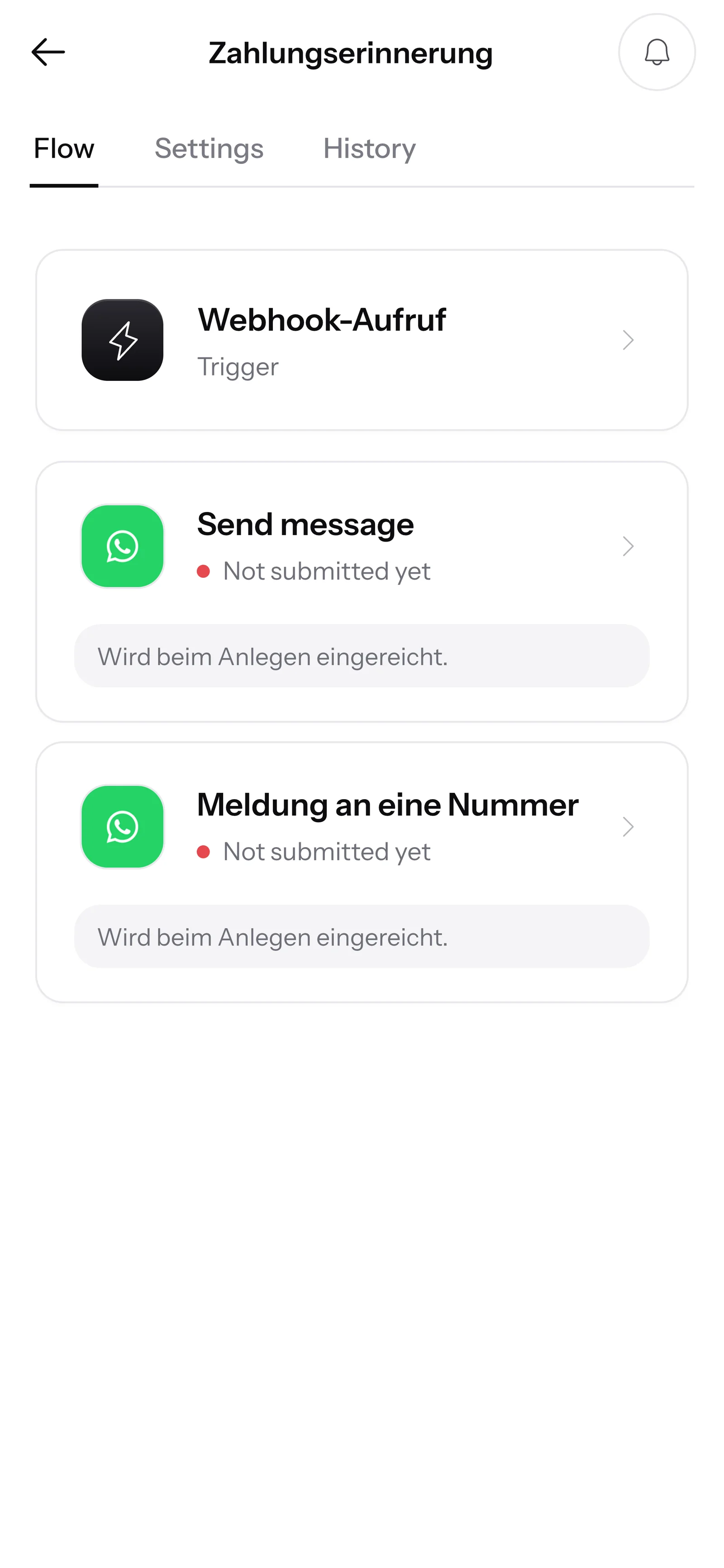
Status at Meta
Ready to send, under review or rejected: it's shown next to every message.
Built in the AI Chat
You describe the automation in the AI Chat, and SmartChat AI builds it.
Test without risk
With a test event, SmartChat runs through the flow with sample data.
Automations at a glance.
- 0 creditsis what a run costs, no matter how often the automation starts
- 24 hrsbefore the appointment the reminder arrives, unless you set something different
- STOPAnyone who writes STOP won't get messages from any automation anymore
Frequently asked questions about automations.
Since when has SmartChat had automations?
Since 3 September 2026. An automation sends a WhatsApp message automatically as soon as the trigger you chose fires.
What starts an automation?
An appointment in your calendar, a webhook notification, an order in your Shopify store, a confirmed sign-up, a keyword in WhatsApp, a fixed date, or a contact who hasn't been in touch for a long time.
Do I have to code to set up an automation?
No, you describe it in the AI Chat, and SmartChat AI builds it. Only for a webhook do you enter an address in your software once.
How do my appointments get to SmartChat?
Through the private iCal address of your Google Calendar, Outlook or Apple Calendar. If an appointment includes a mobile number, SmartChat sends a WhatsApp reminder beforehand.
When does the appointment reminder arrive?
If you don't set anything, 24 hours before the appointment. You choose the lead time yourself.
Can I try out an automation first?
Yes, with a test event SmartChat runs through the flow with sample data, and nothing is sent to your contacts.
How many automations do I get in each plan?
Free and Starter have 1 automation, Basic 3 and Pro unlimited. The fixed confirmation for new contacts counts toward this.
Does every run of an automation cost credits?
No, a run costs no credits. Every message sent counts toward your message allowance.
Does an automation also reach unsubscribed contacts?
No, anyone who has written STOP won't get messages from any automation anymore.
What happens if I pause an automation?
It no longer starts for new events, and pending messages are not sent. All the details: Automations.
Let SmartChat send for you.
Enter your website, and SmartChat AI builds your WhatsApp marketing system in 60 seconds. Then you describe your first automation in the AI Chat.
More News.
All newsSmartChat V2 is here.
You enter your website, and SmartChat AI builds your WhatsApp marketing system in 60 seconds, with a landing page, confirmation message and follow-ups.
Partner program: up to €1,000 per referral.
Recommend SmartChat with your invite link and get up to €1,000 as soon as a business you invited books its first plan.
Agency partner program with 30% discount.
Agencies apply as partners and, once qualified, get 30% off their own account and all client accounts.