WhatsApp notifications for urgent problems.
If your WhatsApp number is disconnected or there are payment problems at Meta, SmartChat immediately sends you a WhatsApp notification in addition to the email.
SmartChat gets in touch for these important problems.
Every problem has its own message. It tells you what is going on and what you can do.
The connection between your WhatsApp number and SmartChat is interrupted. Your messages are only sent again after you reconnect.
If the payment method is missing in your Meta Business account or was declined, Meta no longer sends messages.
If Meta has restricted or blocked your number, SmartChat can't send anything. In the message, you book a short appointment with the SmartChat team.
If the charge for your SmartChat subscription fails, SmartChat gets in touch right at the start of the grace period. Your sending keeps running during this time.

Two ways instead of one.
You always get the email notification for an urgent problem. The WhatsApp notification comes on top.
Email only
- The warning sits in the inbox among all the other emails.
- You often only see the warning when you're back at the computer.
- Until then, your messages don't reach your contacts.
Email plus WhatsApp
- The WhatsApp appears immediately on your lock screen.
- The WhatsApp comes from SmartChat's number, even if your number is having trouble.
- The email still comes, as a second way.
What happens with a problem?
SmartChat detects it
If your number is disconnected or there are payment problems at Meta, SmartChat detects it automatically.
AutomaticYou get an email and WhatsApp notification
You always get the email notification, and the WhatsApp notification in WhatsApp on top.
InstantlyYou fix the problem
You reconnect your number or add a valid payment method at Meta. After that, your messages are sent again.
A few minutes
In three steps set up.
The WhatsApp notification is an option you set up yourself. All you need is your mobile number. The admin of your account can set it up.
- 1
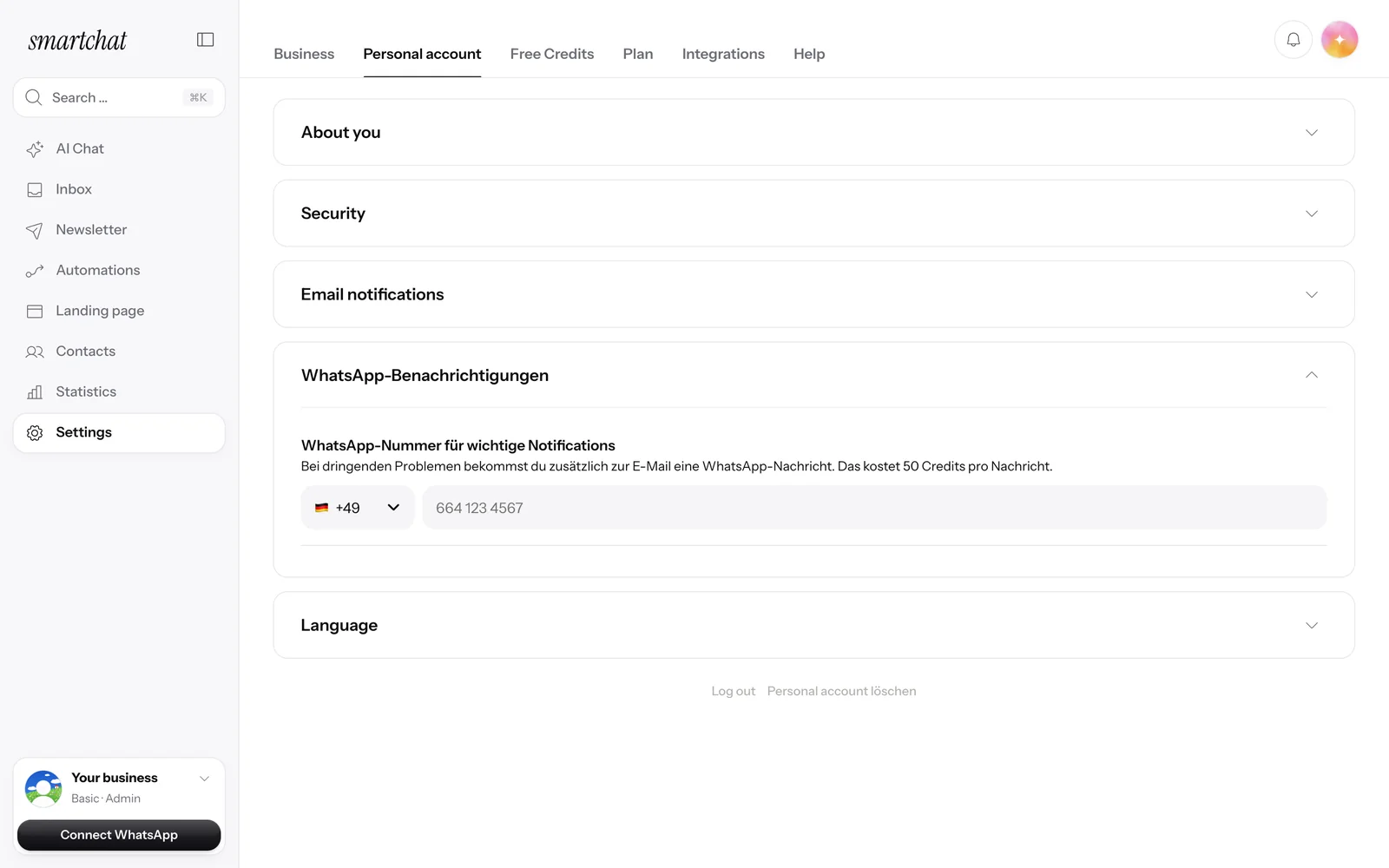
Open your personal account
In the settings, click Personal account. Right below the Email notifications you'll find the WhatsApp notifications.
- 2
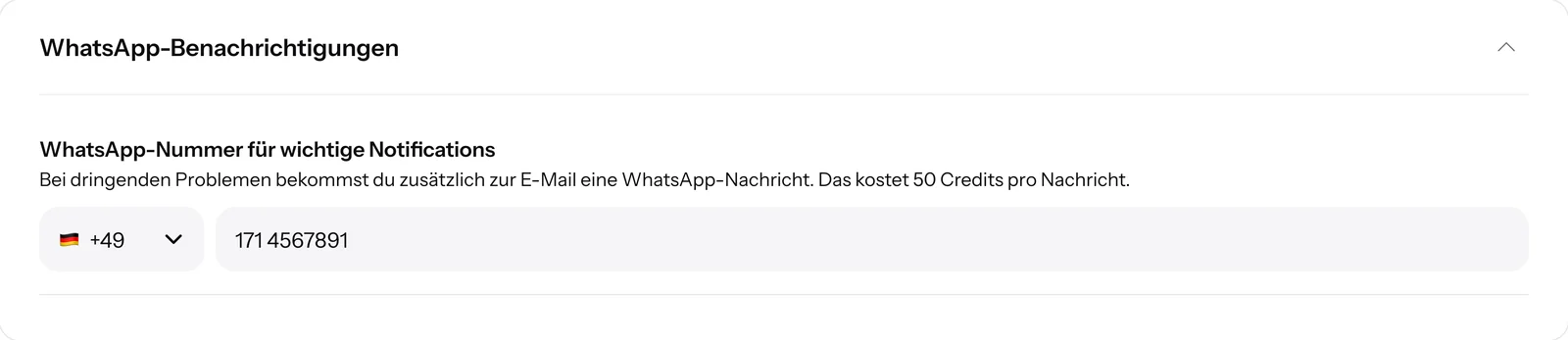
Enter your mobile number
Enter your mobile number.
- 3
Active without another click
As soon as the number is in, the WhatsApp notification is active.
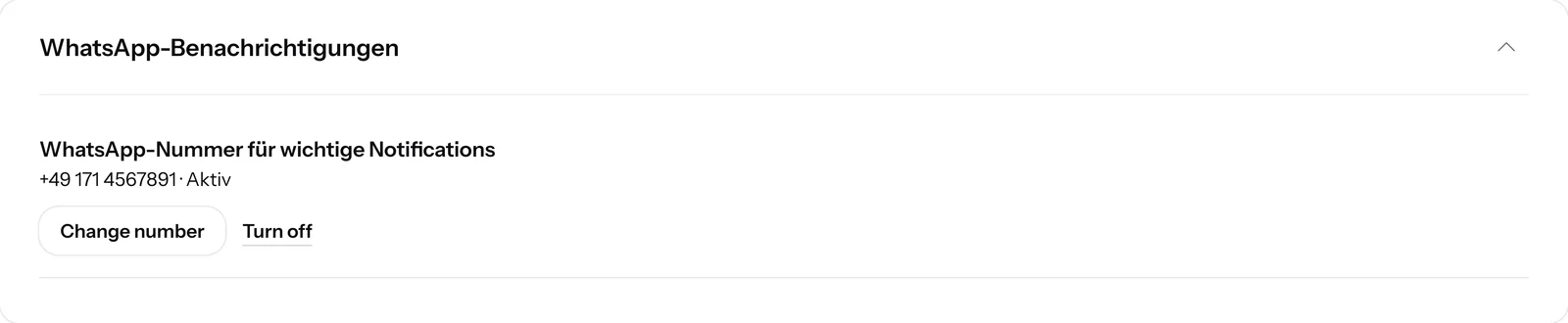


One switch and your number.
Once the WhatsApp notification is active, you see your number in the settings. With one click you change it or turn the notification off.

The email still arrives
The WhatsApp message comes on top. You always get the email about the same problem as well.
Not the same message over and over
If a problem lasts longer, SmartChat doesn't keep sending you the same WhatsApp message.
Credits only on success
The 50 credits are only deducted if Meta has accepted the message. If sending fails, they go back to you.
One click, and you get help.
Every notification has exactly one button: I need help. Your reply goes straight to SmartChat.
Reply with one click
You don't have to write anything. One click on the button is enough.
Clearly structured
The problem comes first, followed by what you can do. No technical jargon and no footer.
Only important notices
The notifications are pure notices about your account. SmartChat sends them as a template approved by Meta.
Which number do you enter??
Enter your private mobile number. The number of your business that is connected to SmartChat doesn't work, because if there were a problem with it, the message wouldn't arrive.

Never the business number
SmartChat doesn't accept a number that is connected to SmartChat here. That way the notice never ends up in the system that is having trouble.
Change it any time
With Change number you enter a new number and give your consent for it.
New messages arrive by email.
SmartChat only reports urgent problems by WhatsApp. You get new messages and handovers from SmartChat AI as an email notification and in the app.

SmartChat tells you why there are problems.
If something is missing for the WhatsApp notification to arrive, the reason is shown right in your settings. You always get the email notification.

Being reviewed by Meta
As long as Meta hasn't yet approved the notification in your language, you only get the email notification.
Never topped up without asking
If your balance isn't enough, SmartChat deducts nothing and only sends you the email.
In your language
German, English, Italian, French or Spanish, depending on the language of your account.
Which plan includes WhatsApp notifications?
The WhatsApp notification works with every active subscription. You get the email about urgent problems on all plans. All prices excl. VAT.
| Free | Starter | Basic | Pro | |
|---|---|---|---|---|
| Price per month | 0 € | 299 € | 499 € | 999 € |
| WhatsApp notification | no | yes | yes | yes |
| Credits per notification | no | 50 | 50 | 50 |
| Credits in the plan | 500 one-time | 3,000 per month | 6,000 per month | 12,000 per month |
| Email for urgent problems | yes | yes | yes | yes |
Frequently asked questions about WhatsApp notifications.
For which problems do I get a WhatsApp notification?
SmartChat reports the most important problems to you via WhatsApp, for example: your number is disconnected, the payment at Meta has problems, Meta has restricted or blocked your number, or the payment for your SmartChat subscription didn't go through.
Which number does the WhatsApp notification come from?
It comes from SmartChat's number, not from your own. If your number is disconnected or blocked, the message still reaches you.
Do I also get new messages from my contacts reported via WhatsApp?
No, SmartChat only reports urgent problems by WhatsApp. You get new messages and handovers from SmartChat AI as an email notification and in the app.
What does the WhatsApp notification cost?
Every WhatsApp notification sent costs 50 credits from your plan. They stay deducted only if Meta accepted the message, and if your balance isn't enough, you only get the email.
Are there fees in my Meta account for it?
No, the WhatsApp notification is sent from SmartChat's number and not through your Meta account. Only the 50 credits are deducted from you for it.
Is the WhatsApp notification also available on the Free plan?
No, it runs with an active subscription, so in Starter, Basic and Pro. You get the email about urgent problems in all plans, including Free.
Who can set up the WhatsApp notification?
The admin of your account. The message goes to all admins who have entered their number. Employees can see in their settings whether the WhatsApp notification is set up.
Which number should I enter?
Enter your private mobile number. SmartChat doesn't accept a WhatsApp Business number that is connected to SmartChat, because the message wouldn't arrive if there were a problem with it.
How often does SmartChat contact me via WhatsApp?
If a problem lasts longer, SmartChat doesn't keep sending you the same WhatsApp about it.
Does SmartChat send a message when I activate it?
No, SmartChat sends no message on activation. SmartChat only saves your consent with time, number and wording.
How do I turn the WhatsApp notification off again?
You click "Turn off" in the settings, and the email keeps coming. If you write STOP to SmartChat, it is off as well, and SmartChat then sends nothing at all to this number.
What happens to the WhatsApp notification when my subscription ends?
Then it pauses, and you only get the email. The switch stays on, and with a new subscription the WhatsApp notification continues.
In which language does the WhatsApp notification come?
In the language of your account: German, English, Italian, French or Spanish. If the message isn't yet approved by Meta in your language, you only get the email.
What happens when I click "I need help"?
Your reply goes directly to SmartChat. That way you get in touch with one click, without having to write an email first.
Every problem straight in WhatsApp.
Enter your website, and in 60 seconds your WhatsApp marketing system is ready. With a subscription, you then enter your mobile number and hear about every urgent problem right away.