Accessible landing pages for your visitors.
SmartChat builds your landing page so that more people can read it, use it and sign up for your WhatsApp newsletter.

Contrast is measured.
When you change the colors of your landing page, SmartChat measures the contrast according to WCAG. If it's below 4.5:1, SmartChat blocks the color so the text stays easy to read.

Checked color pairs
For the first build, SmartChat AI only uses color pairs that have been checked by hand for sufficient contrast.
Weak contrast is blocked
SmartChat prevents contrast that's too weak. A ratio of 4.5 to 1 is required.
Fixed parts stay
The legal notice, privacy policy and sign-up form can't be hidden.
Accessibility is built into the code on your landing page.
SmartChat sets these parts automatically, you don't have to code anything.
.bk-btn:focus-visible { outline: 3px solid var(--brand); outline-offset: 3px; }Visible focus
Anyone moving through your page with the Tab key sees a clear outline on buttons, questions and links. On dark areas, it's white.
<html lang="de">Page language
Screen readers and browser translation read your landing page in the right language.
<img alt="Backhaus Sommer: Hauptbild des Betriebs">Image descriptions
Every image has a description in the language of your page that names its role.
<div role="dialog" aria-modal="true"> <button aria-label="Schließen"> <select aria-label="Ländervorwahl">Labeled sign-up window
The sign-up window is marked up as a dialog. The close button and the country code have a description.
@media (prefers-reduced-motion: reduce) { .bk-hero-video video { display: none } }Less motion
If a visitor has chosen less motion, your page shows a still image instead of the background video.
A labeled sign-up window.
Screen readers recognize the sign-up window as a dialog with a heading. The country code field and the close button are labeled too.
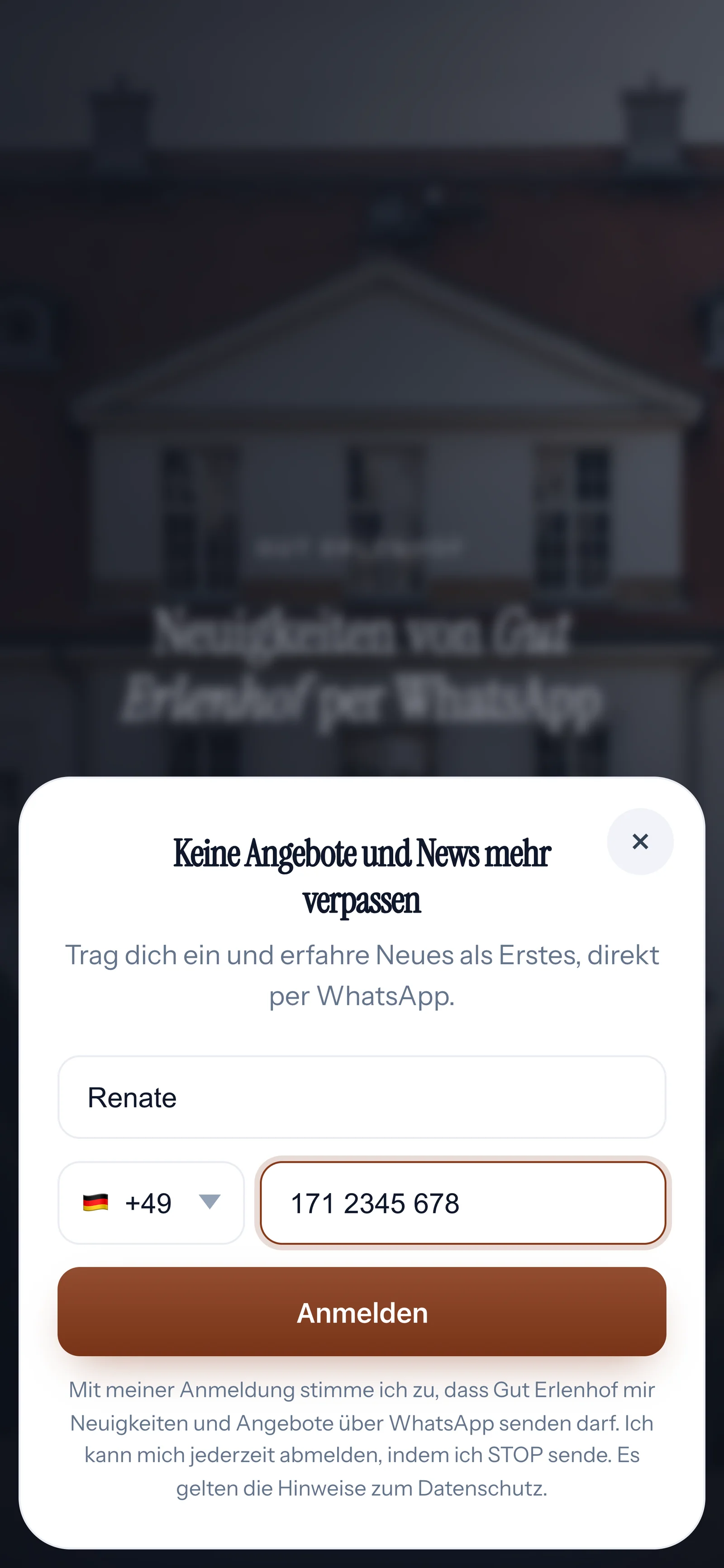
Dialog with a heading
The window tells screen readers what it's about.
Country code labeled
The code selection is read out as country code.
No animation on request
With less motion, the window appears without animation.
What SmartChat takes care of and what you check yourself.
SmartChat lays the foundation. This doesn't replace a full test of your page.
What you check yourself
- Your own colors: check for yourself that your page is easy to read for your visitors.
- Your own images: put important information on the page as text so screen readers can read it.
- Legal: whether special rules apply to your business is something to clarify with your legal advisor.
What SmartChat takes care of
- Measuring contrast according to WCAG and blocking contrast that's too weak.
- A visible outline for keyboard use.
- Page language, image descriptions and less motion on request.
Frequently asked questions about accessibility.
Is my SmartChat landing page accessible?
SmartChat builds in many basics automatically: measured contrast, visible keyboard focus, page language, image descriptions, a labeled sign-up window and less motion on request. This doesn't replace a full test of your page.
Does this replace a legal review?
SmartChat can't promise you that. Whether special rules apply to your business and what they require is something to clarify with your legal advisor.
How does SmartChat check the contrast?
SmartChat calculates the contrast ratio between text and background according to WCAG. If it's below 4.5:1, SmartChat blocks the color so the text stays easy to read.
Does SmartChat block colors with too little contrast?
Yes. SmartChat prevents contrast that's too weak; a ratio of 4.5 to 1 is required. For the first build, SmartChat AI only uses color pairs that have been checked for sufficient contrast.
Can my landing page be used with a keyboard?
Buttons, expandable questions and links in the footer show a clear outline as soon as someone moves through the page with the Tab key. On dark areas, the outline is white.
What does a screen reader read out for my images?
Every image has a description in the language of your page, for example “Backhaus Sommer: main image of the business”. It names the role of the image, not every detail in it.
Why is the language in the code of my landing page?
So that screen readers and browser translation read your page in the right language. SmartChat adds the language automatically.
What do visitors see who have chosen less motion?
A still image instead of the background video. Button movements and the animation of the sign-up window are turned off.
Is the sign-up window understandable for screen readers?
It's marked up as a dialog with a heading, and the close button and the country code are labeled.
Is this about the accessibility of the SmartChat website?
No, this page shows the landing pages SmartChat builds for you. You'll find our own statement under Accessibility.
Build your landing page in 60 seconds.
Enter your website. SmartChat AI builds your landing page with measured contrast, visible focus and image descriptions.